How to install MT5 on Android for Deriv

Trading on the go doesn’t mean sacrificing the powerful tools you rely on at your desktop and with MetaTrader 5 (MT5) available on Android, you can access advanced charting, technical indicators, and full trading functionality straight from your phone. Whether you’re topping up between meetings or monitoring the markets from anywhere, having MT5 installed on your Android device keeps you connected to your Deriv account at all times. In this guide, we’ll walk you through exactly how to install MT5 on Android for Deriv, step by step, so you can start trading on the move. The official MetaTrader5 site will guide you on how to tailor your MT5 Platform Settings.

If you have not set up a Deriv Account you can do so here before proceeding with installing your MT5. If you are getting MT5 for your PC the process is slightly different so you will need to see How to download MT5 on Deriv for PC.
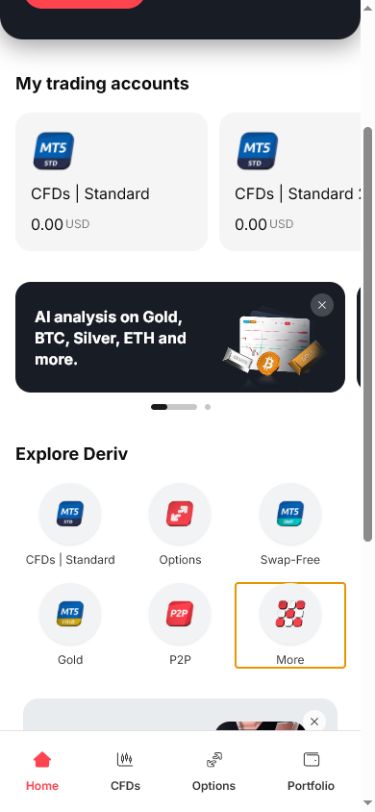
Mobile app screen on Android showing trading account balances, an AI analysis banner on gold, BTC, silver, ETH, and more, plus options for CFDs, Options, Swap-Free accounts compatible with MT5, Gold trading via Deriv, P2P services, and a "More" button highlighted in orange.
Mobile app screen on Android showing trading account balances, an AI analysis banner on gold, BTC, silver, ETH, and more, plus options for CFDs, Options, Swap-Free accounts compatible with MT5, Gold trading via Deriv, P2P services, and a “More” button highlighted in orange.

Step 1: Open Trader’s Hub on Your Phone

Log into your Deriv account through your Android browser and open Trader’s Hub. If you don’t already have an MT5 account, get started with Deriv first, then download the app.

Step 2: Tap the MT5 Download Option

In the MT5 section, tap “Download” next to the Android option. This takes you to the Google Play Store listing for MetaTrader 5.
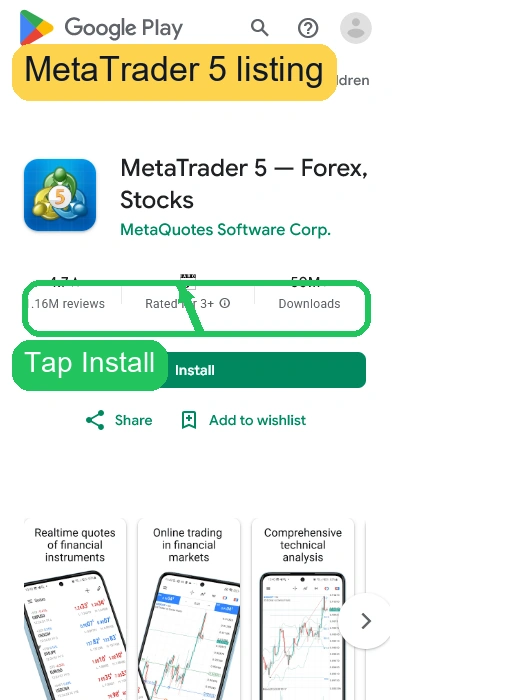
Google Play listing for the MetaTrader 5 (MT5) Android app, showing app name, rating, 1.6M reviews, install button, and preview images with dynamic financial charts—ideal for accessing platforms like Deriv on the go.

Step 3: Install the App

Tap “Install” on the Play Store page. The app will download and install automatically, the same as any other Android app.

Google Play's MT5 app page showing install progress, star rating, downloads, and preview images of financial graphs below. Labels read "Install progress" and "Android setup step," highlighting how easy it is to get started with Deriv trading on your Android device.
Google Play’s MT5 app page showing install progress, star rating, downloads, and preview images of financial graphs below. Labels read “Install progress” and “Android setup step,” highlighting how easy it is to get started with Deriv trading on your Android device.

Step 4: Open MT5 and Add Your Account

Once installed, open the app. On first launch, MT5 will prompt you to log into an existing account rather than create a new one.

If you already have your MT5 login details, our How to Log into MT5 on Deriv guide shows the next step clearly.

App opening screen showing options to open a real or demo account on Deriv, with a button below labeled "Login to an existing account." Yellow and blue highlights emphasize sections, creating a clear and user-friendly Android interface for seamless MT5 access.
App opening screen showing options to open a real or demo account on Deriv, with a button below labeled “Login to an existing account.” Yellow and blue highlights emphasize sections, creating a clear and user-friendly Android interface for seamless MT5 access.
Advertisement for Deriv trading platform with the text "Trade Synthetic Indices 24/7. Volatility. Precision. Control." and a "Start Now" button, featuring candlestick charts and a red lightning bolt on a graph background.
Advertisement for Deriv trading platform with the text “Trade Synthetic Indices 24/7. Volatility. Precision. Control.” and a “Start Now” button, featuring candlestick charts and a red lightning bolt on a graph background.

Step 5: Enter Your Deriv MT5 Login Details

Search for the Deriv-MT5 server, or enter it manually, then input your Login ID and password from your MT5 account details in Trader’s Hub.
MetaTrader 5 mobile site page showing account connection help, with repeated links for opening a demo or live account on Deriv, and optimized for Android users seeking quick MT5 access.

Step 6: Confirm You’re Connected

Once logged in, check your balance and account number against what’s shown in Trader’s Hub to confirm you’re connected to the right account.

A smartphone screen shows an account dashboard with the Deriv MT5 Android Demo. The balance is 9,999.54 EUR, and account status details are displayed. Tabs for Quotes, Charts, Trade, History, and Messages appear below.

You’re Set Up

That’s MT5 installed and connected on Android. From here, charts, trading, and account management are all available directly from your phone. In How to switch between demo and real accounts on Deriv we show you how to navigate between your different accounts.

To earn extra income by supporting new traders on Deriv you can join the Deriv Partner Program and become an affiliate.

A globe with a red upward arrow and bar graph. Text: “Support traders and earn commissions. Discover success in forex affiliate marketing—partner with a global trading platform.” Red button says “Explore Program.”.

FAQ: Installing MT5 on Android for Deriv

Is the MT5 Android app free? Yes, downloading and installing MetaTrader 5 from the Play Store doesn’t cost anything.

Do I need an MT5 account before installing the app? Yes, create one through Trader’s Hub first, since the app requires login credentials to connect.

What if I can’t find the Deriv-MT5 server in the app? Try entering it manually using the exact server name shown in your MT5 account details in Trader’s Hub.

Can I use MT5 on Android and desktop with the same account? Yes, your login credentials work across all MT5 platforms, so you can switch between devices freely.
Learn Affiliate Marketing and Earn Online

Leave a Comment

Your email address will not be published. Required fields are marked *

Learn Affiliate Marketing and Earn Online
Scroll to Top
