How to Transfer Funds Between Wallets on Deriv

Deriv’s wallet system is built for flexibility, but that only helps if you can actually move money where you need it, when you need it. Say you’ve got a balance sitting in your USD wallet but your MT5 account needs topping up. Instead of withdrawing and redepositing, Deriv lets you shift funds internally in a few taps. No fees, no waiting on external processors, just an instant move between accounts you already control. Here’s exactly how the transfer works and what to check before you hit confirm. Moving funds between wallets is an example of an internal transfer. If you’re unfamiliar with the concept, LegalClarity provides a straightforward explanation of how internal transfers work within the same financial institution, helping you understand why these transfers are often processed quickly.

If you are completely new to Deriv you can start by creating an account here.
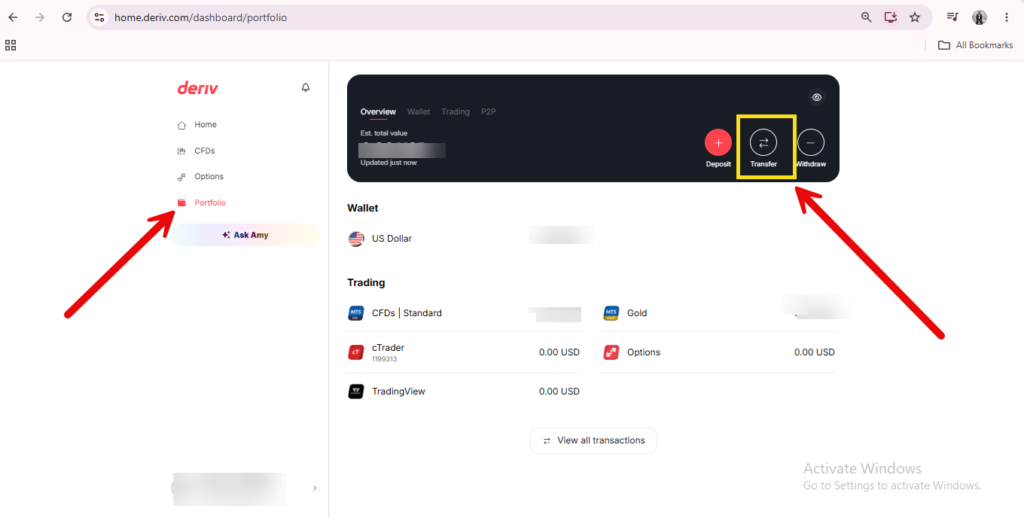
A screenshot of the Deriv dashboard highlights the “Portfolio” menu on the left and the “Transfer” button in the wallet section with red arrows and a yellow box, illustrating how to move money Deriv Wallet or initiate a Deriv currency conversion transfer.

Step 1: Open Your Wallets

Log into Deriv and click the wallet icon in the top left of the dashboard to open your Wallets overview.
A digital ad for Deriv promotes trading synthetic indices 24/7, highlighting volatility and control. Icons show trading benefits, with a red "Start Now" button guiding users through the Deriv registration process. Red and black wavy lines enhance the look.
A digital ad for Deriv promotes trading synthetic indices 24/7, highlighting volatility and control. Icons show trading benefits, with a red “Start Now” button guiding users through the Deriv registration process. Red and black wavy lines enhance the look.

Step 2: Select the Source Wallet

Choose the Wallet you want to move funds from. This becomes the source for the transfer.
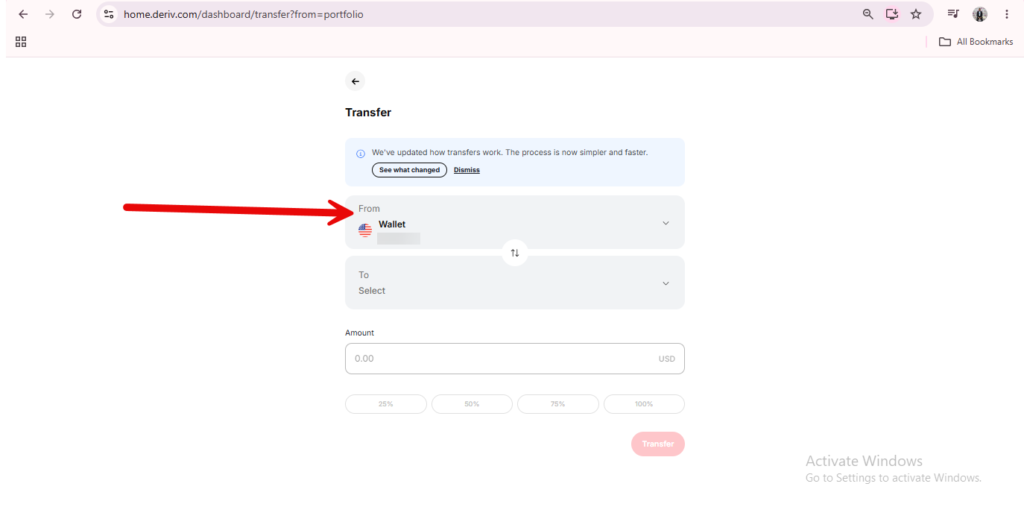
A red arrow points to the “From Wallet” section on a digital transfer webpage, showing the selection area for choosing the source of funds when you want to move money Deriv Wallet or initiate a Deriv currency conversion transfer.

Step 3: Click Transfer

Look for a “Transfer” button within the Wallet screen, separate from Deposit and Withdraw.
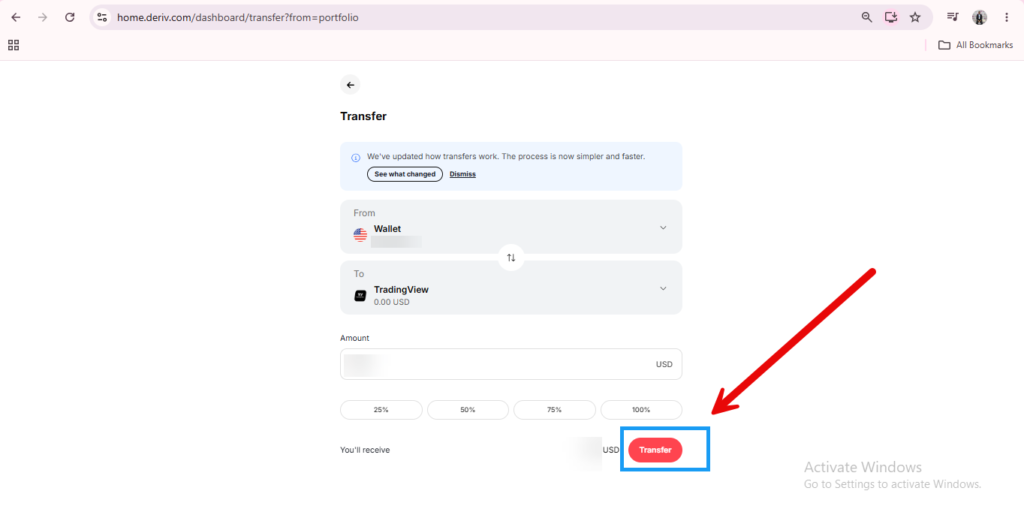
Screenshot of a transfer page showing a Deriv Wallet transfer, with currency being moved from a wallet to TradingView, and an arrow pointing to the red “Transfer” button at the bottom right.

Step 4: Choose Your Destination

Select where the funds should go. This could be another Wallet in a different currency, or a trading account like MT5.
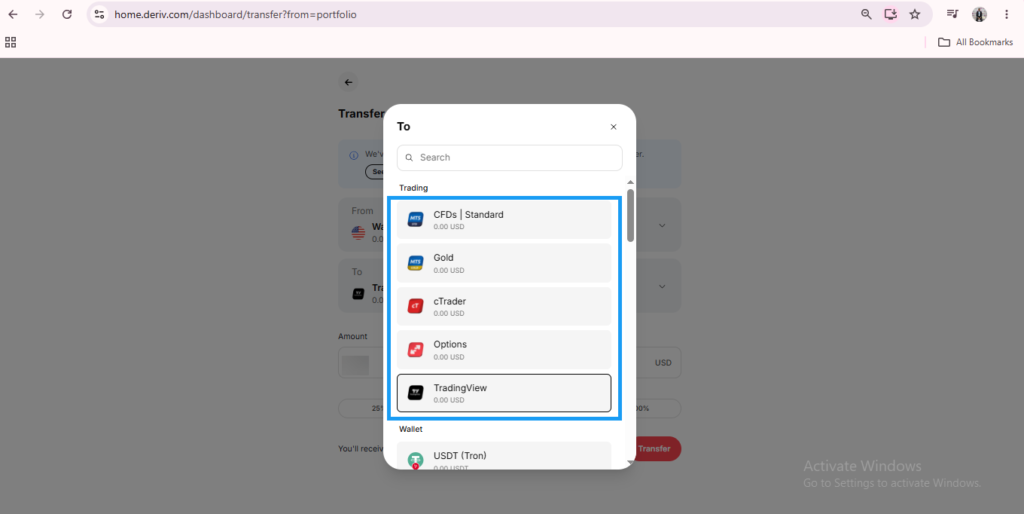
A screenshot of a transfer window on a trading platform, showing account options like CFDs, Gold, cTrader, Options, and TradingView—with TradingView highlighted—demonstrates how users can easily move money Deriv Wallet between different accounts.

Step 5: Enter the Amount and Confirm Any Conversion

Type in how much you want to transfer. If the source and destination use different currencies, Deriv will show the converted amount and any applicable rate before you confirm.
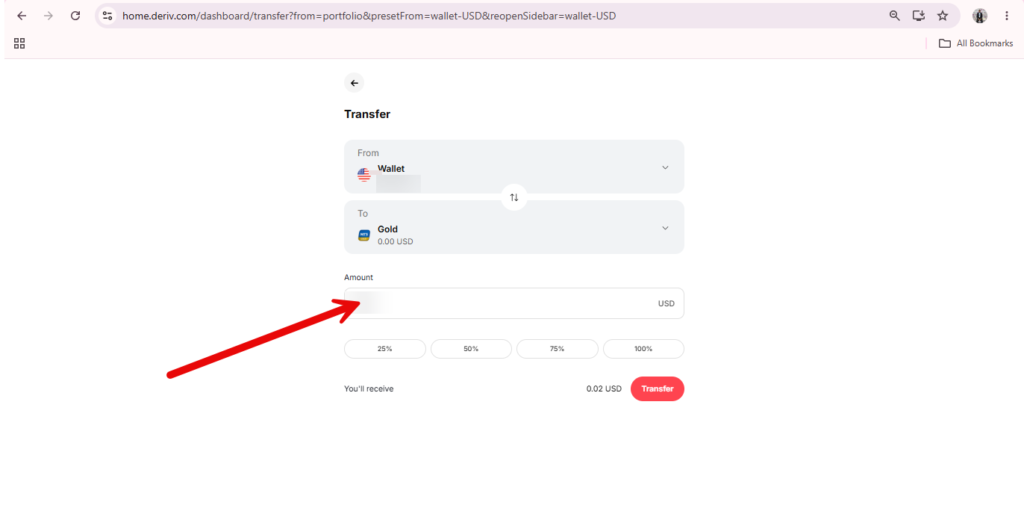
A red arrow points to the “Amount” input field on a transfer page, where users can enter a USD value to transfer funds Deriv Wallets or move money Deriv Wallet from a wallet to a gold account.

Step 6: Review and Confirm the Transfer

Double-check the amount, source, and destination, then confirm. Transfers between your own Wallets and accounts are typically processed almost instantly.
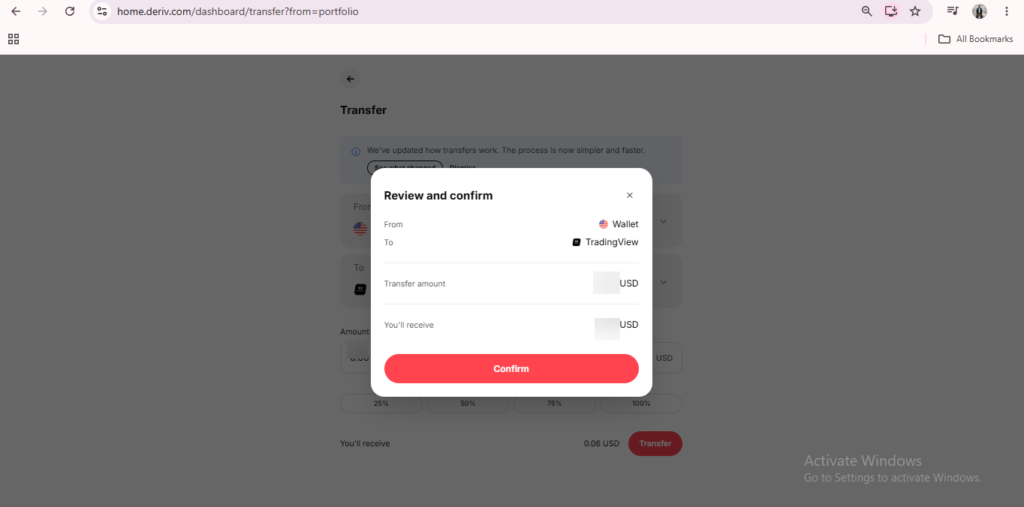
A transfer confirmation popup on a financial dashboard shows fields for “From Wallet,” “To TradingView,” transfer amount, and received amount in USD, with a red “Confirm” button at the bottom—providing users with a clear summary of their Deriv Wallet transfer details.

Funds Moved

That’s the full process for transferring between Wallets on Deriv. Since this is a core part of getting money ready to trade, it’s worth pairing with our guide on What Is the Deriv Wallet? If you’re still getting a feel for how the system fits together, or How to Switch Between Wallets if you’re managing several at once.

Moving money around your own account is one thing. Some Deriv users also build a quiet second income by simply pointing new people toward the platform. It’s worth ten minutes to see how that actually works. There is another place for extra help and tools to make your first dollar and you can it check out here.

A digital ad with the text "Support traders and earn commissions. Partner with a global trading platform." A red arrow rises over a gray globe. A red button below says "Explore Program.
A digital ad with the text “Support traders and earn commissions. Partner with a global trading platform.” A red arrow rises over a gray globe. A red button below says “Explore Program.

FAQ: Transferring Funds Between Wallets on Deriv

Are transfers between my own Wallets instant? Generally yes, since they don’t involve external banking or payment providers, unlike deposits and withdrawals.

Is there a fee for transferring between Wallets? Deriv typically doesn’t charge for this, though currency conversion between different Wallet types may involve a rate adjustment.

Can I transfer directly from one crypto Wallet to another crypto Wallet? Yes, as long as both Wallets are active on your account, transfers work the same way regardless of currency type.

Can I transfer funds back from a trading account into my Wallet? Yes, funds can generally be transferred back out of a trading account into your Wallet whenever you’re not actively using them.

Learn Affiliate Marketing and Earn Online

Leave a Comment

Your email address will not be published. Required fields are marked *

Learn Affiliate Marketing and Earn Online
Scroll to Top
