If you’re used to Deriv’s older layout, the path to your trading platforms has moved. The recent dashboard update reorganized how Trader’s Hub surfaces MT5, cTrader, SmartTrader, and the rest, so a shortcut you had memorized may no longer land where you expect. The good news is the new structure is actually more consolidated, once you know where it sits. Here’s exactly where to find your platforms from the updated dashboard. Once you log in to Deriv, you can access the trading platforms available to your account from the relevant sections of the dashboard. Deriv’s current platform information provides an overview of the different options available, including Deriv MT5, cTrader, Deriv Trader and Deriv Bot.
If you are still new to Deriv and you need an account you can open one here.

Step 1: Log In and Land on Deriv Dashboard
Log into Deriv, and you’ll arrive directly on the home section of the Dashboard.
Step 2: Scroll Through the Platform Cards
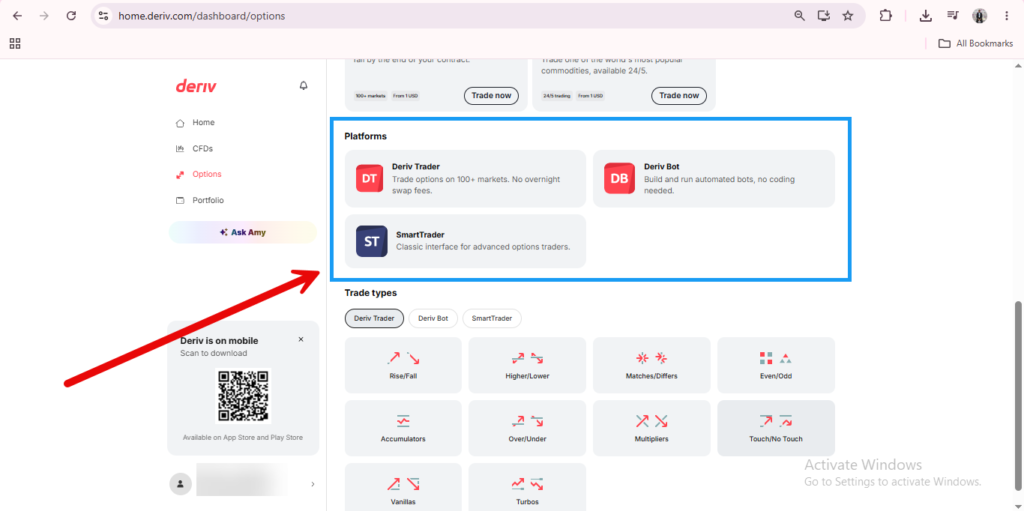
On the side panel to your left you will find four options to navigate which are, “Home, CFDs, Options and Portfolio”. For the trading platforms we are interested in CFDs and Options.

Step 3: Click Add More Accounts
If you haven’t set up an account on a specific platform yet, click on it and you will be redirected to follow prompts to create your account. This applies mainly to CFDs. When trading options you do not need to create any new account. Everything you need is available in the browser and on the Deriv platform itself.


Step 4: Click on an Existing Account
If you already have an account, simply click on the account you want to access and proceed to enter the relevant log in details. You can choose to use the web version or the app version of the chosen platform.

Step 5: Check the Real and Demo Tabs
Remember that the Deriv Dashboard separates Real and Demo accounts, so double-check you’re on the right tab if a platform doesn’t appear where you expect.

Step 6: Switch Between Platforms Without Logging Out
You can move between platforms freely from the Deriv Dashboard-Options without needing to log out of Deriv entirely each time. This mainly applies to Options. CFDs will still require login details for the different accounts you may have.
One Dashboard, Several Platforms
Once you know the Dashbaord is the launch point for everything, switching between Deriv Trader, MT5, and the rest becomes a quick, repeatable habit. For a fuller sense of what each platform actually offers, our guide on What Are Deriv Trading Platforms breaks them down individually.
Getting comfortable moving between platforms is useful, but it’s worth knowing there’s also a way to earn from Deriv that has nothing to do with trading on any of them. A quick look here explains how.

FAQ: Accessing Trading Platforms from the Deriv Dashboard
Do I need to create a new account for every platform? Yes, each platform generally requires its own account setup, accessible via the “Get” option on its card in Trader’s Hub.
Can I access these platforms from the mobile app? Yes, Trader’s Hub is available on Deriv’s mobile app with a similar layout for accessing each platform.
Why can’t I see a platform I created earlier? Check whether you’re viewing the Real or Demo tab, since accounts are separated between the two.
Is there a faster way to jump to a platform I use often? Some setups let you pin or favorite frequently used platforms, so check Trader’s Hub for that option if it’s available to you.