If you’ve spent any time researching Weltrade, MT5 comes up constantly. It’s the platform behind nearly every account type the broker offers, including SyntX. Here’s what it actually is and why it matters for how you’ll trade. Weltrade provides access to MetaTrader 5, a multi-asset platform that combines market analysis, charting and trade-management tools in one interface. MetaTrader 5’s official platform overview explains the core features and functionality available through the platform.

If you have not opened a Weltrade account you can create one here.
What MT5 Actually Is
MetaTrader 5 is a multi-asset trading platform supporting advanced charting, a wide range of technical indicators, and automated trading through Expert Advisors. Compared to its predecessor MT4, MT5 supports more instrument types and offers additional order types, deeper market depth information, and generally faster execution infrastructure which is part of why Weltrade runs its SyntX and Raw Spread accounts exclusively on it. Traders coming from MT4 usually adjust within a session or two, since the core layout and trading logic carry over even as the toolset expands.
Where You Can Use It
Weltrade offers MT5 across desktop (Windows and Mac), a web-based terminal that runs directly in your browser with nothing to install, and mobile apps for both Android and iOS. All versions connect to the same underlying account, so a position opened on desktop is instantly visible on mobile.

Getting Set Up
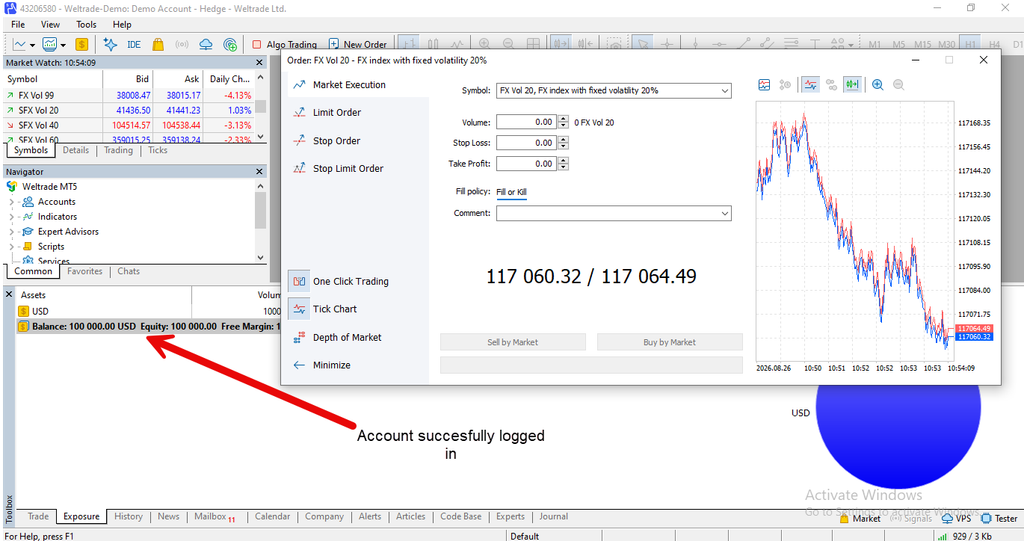
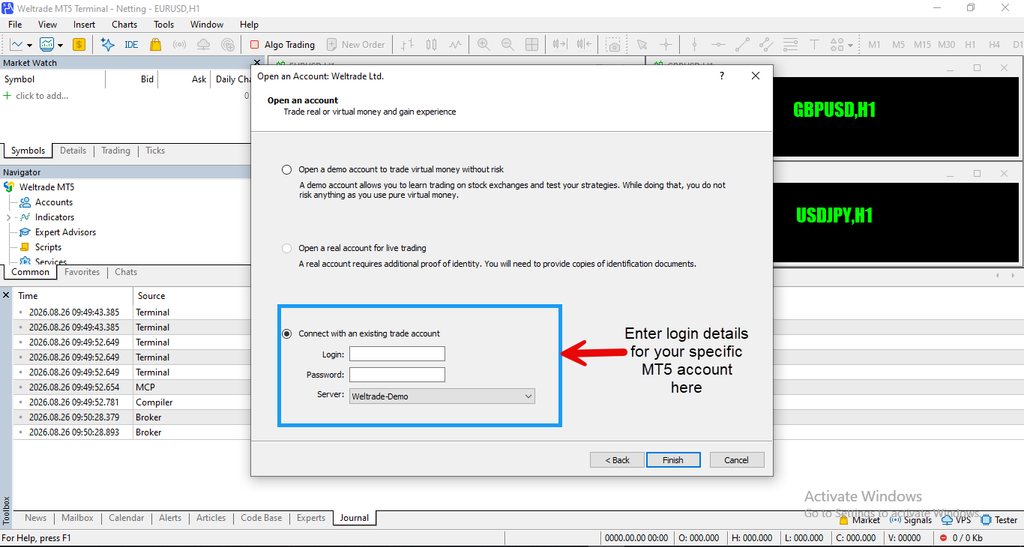
To use MT5, download it from the Download Trading Platform section of your Weltrade Personal Profile, install it, and log in using the account number and password generated specifically for that trading account. These credentials are separate from your main Weltrade profile login. You’ll also need to select the correct server, typically labeled Weltrade-Live for real accounts or Weltrade-Demo for practice. For the specific steps to link your account, see our guide on How to Connect Weltrade to MT5,
What You Can Do Inside It
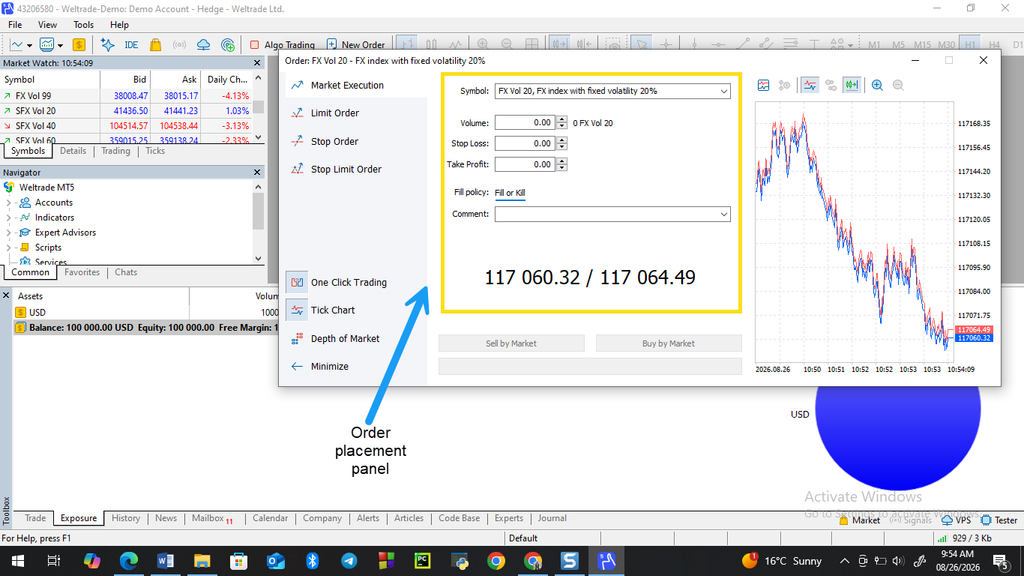
Once logged in, MT5 gives you full access to charts, the Market Watch panel for managing which instruments are visible, and order placement tools for both market and pending orders. You can set stop-loss and take-profit levels directly when opening a position, save multiple account logins for quick switching, and monitor open trades and account balance in the Trade section at the bottom of the terminal.
Why It Matters for SyntX Specifically
Since Weltrade’s SyntX account runs exclusively on MT5, unlike some other account types that also support MT4, getting comfortable with the platform is a prerequisite for trading synthetic indices at all. The good news is that MT5’s interface is largely consistent whether you’re viewing a forex pair or a synthetic instrument, so the learning curve is mostly about the platform itself rather than anything SyntX-specific. Once you’ve placed a few trades on any instrument, navigating a synthetic index chart feels like second nature. For what SyntX itself looks like once you’re inside the platform, see What Is the Weltrade SyntX Account.

A Quick Note on Copy Trading
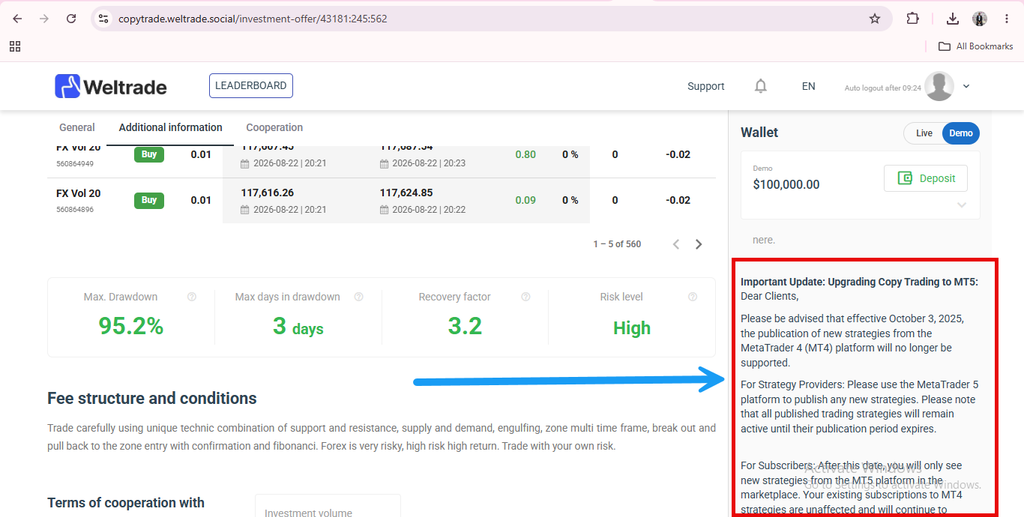
If you’re interested in copy trading on Weltrade, it’s worth knowing that new strategy publishing has moved to MT5-only as of recent platform changes, with existing MT4-based strategies remaining active only until their publication period expires. That’s one more reason MT5 has become the more future-proof platform to build your setup around.
Getting Comfortable
Whether you’re trading forex, Raw Spread instruments, or SyntX, MT5 is the common thread across most of what Weltrade offers.
More and more traders are adding to their income by being affiliates. The Weltrade Partner Program is built just for that and you too could join the fast growing community of global partners.

