You have set up your deriv account and now it is verified. The next step is funding your account. Deriv gives you several options when it comes to deposit methods. With the new and updated dashboard you will find the process very easy. As a trader you can choose whichever method works best for you. So let us go through how to deposit money into your Deriv account. Learn more about how you can protect yourself from fraud and scams related to online financial services on Forex Fraud and Risk Guidance.
If you have not created a Deriv Account yet you can do so before you proceed with the steps below. In another related guide we cover How to deposit using Crypto on Deriv.
Step 1: Go to the Dashboard
Log into your Deriv account and click “Deposit” from the main dashboard. This is where all funding options are listed.

Step 2: Choose Your Deriv Account
If you have more than one account (for example, a cTrader account, an options account or an MT5 account), select which one you want to fund before continuing.
Make sure you are on real account and pick the account you want to deposit into.
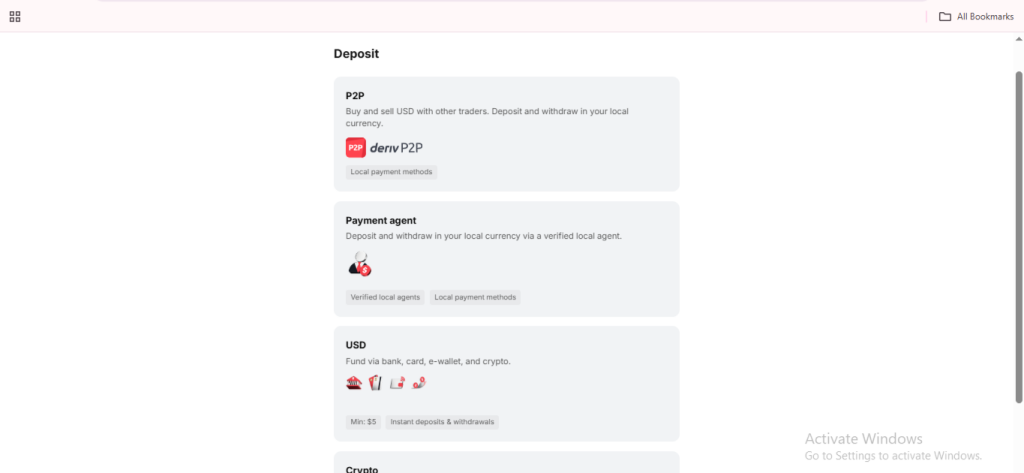
Step 3: Select a Deposit Method
Deriv offers a range of deposit options, including:
- Bank transfer
- Credit or debit card
- Cryptocurrency
- Local payment agents, depending on your country
- Deriv P2P
Available options vary by region, so choose whichever appears for your account and most convenient for you.
Step 4: Enter Your Deposit Amount
Specify how much you would like to deposit by typing in the amount in the correct field. Take special notice on any minimum deposit amount shown for your chosen method, and note that some methods may carry processing fees. In that case you will need to make sure you are prepared to cover the processing costs so they do not eat into your deposit amount. For extra reference you can also look at the article How to deposit using Visa and Mastercard on Deriv.

Step 5: Confirm Your Payment Details
Depending on the method you chose, you may be required to enter card details, select a wallet, or generate a bank reference number. Before you can confirm anything make sure you double check everything.
Step 6: Complete the Deposit
Click “Deposit” to finalize the transaction. Card and e-wallet deposits are usually instant, while bank transfers can take longer depending on your bank.
Your Funds Are In
Once the deposit clears, your balance will update in your Deriv account or linked MT5 account, and you’ll be ready to go.
In another guide we will cover How Deriv P2P Works as a payment method in detail.
The Deriv Partner Program offers individuals an opportunity to earn extra income by partnering as an affiliate. By simply helping traders to onboard you will earn commissions in the process.
FAQ: Depositing Money into Deriv
What is the minimum deposit on Deriv? The minimum varies by deposit method and currency, and is shown on the deposit screen once you select a payment option. Typically they start from $5.
How long does a Deriv deposit take to process? Card and e-wallet deposits are typically instant. Bank transfers can take a few business days depending on your bank and location.
Are there fees for depositing into Deriv? Some methods carry processing fees, which are usually shown before you confirm the transaction. Deriv itself doesn’t always charge for deposits, but third-party providers might.
Can I deposit into Deriv using cryptocurrency? Yes, Deriv supports select cryptocurrencies as a deposit method, alongside bank transfers, cards, and e-wallets.