How to Deposit Using Crypto on Deriv

For traders who value speed, privacy, and low fees, depositing with cryptocurrency is one of the most convenient ways to fund a Deriv account. Whether you’re using Bitcoin, Ethereum, USDT, or another supported coin, crypto deposits are typically fast and don’t come with the delays sometimes seen with traditional banking methods. In this guide, we’ll walk you through exactly how to deposit using crypto on Deriv, step by step, so you can get your funds into your account quickly and securely. If you a new to crypto, a platform like Coingecko has resources to guide you through everything you need to know to keep your wallet secure.

If you still need a Deriv account, create a Deriv account first so you can finish the deposit without stopping later. If you want to check your account status before moving on, see our How to Verify Your Deriv Account.

Step 1: Go to the Deriv Cashier

Log into your Deriv account and click “Deposit” or “Cashier” from the main dashboard.

Step 2: Select Your Cryptocurrency

Choose from the supported cryptocurrencies listed, such as Bitcoin, Ethereum, or others available for your account.
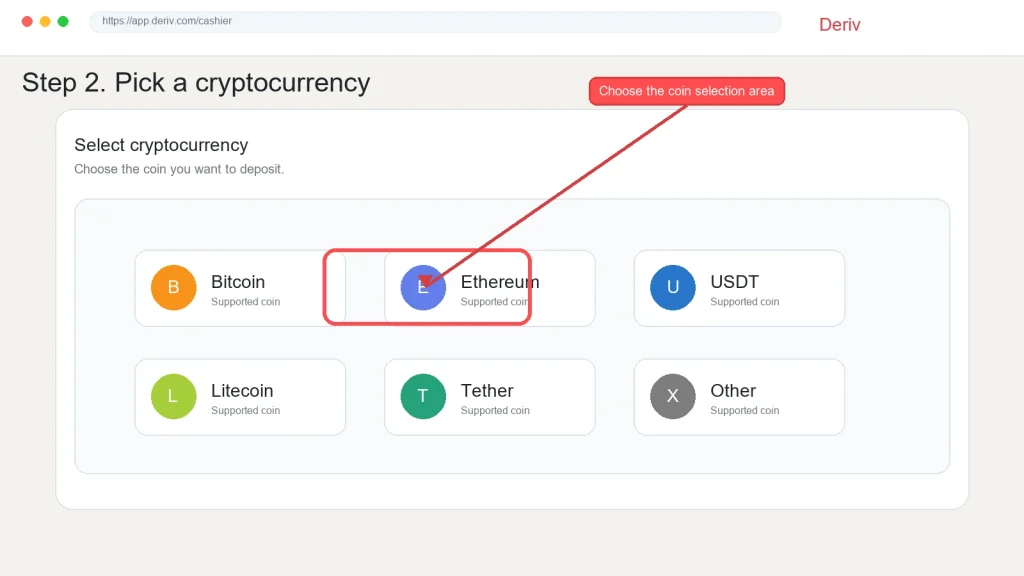
A webpage shows cryptocurrency options with Ethereum selected. A red arrow points to Ethereum with the label “Choose the coin selection area.” Other options include Bitcoin, USDT, Litecoin, Tether, and Other. This user-friendly interface makes it easy to deposit using crypto on Deriv by simply selecting your preferred coin.

Step 3: Copy the Deposit Wallet Address

Deriv will generate a unique wallet address (often shown alongside a QR code) for your deposit. Copy this carefully, or scan the QR code from your crypto wallet app.
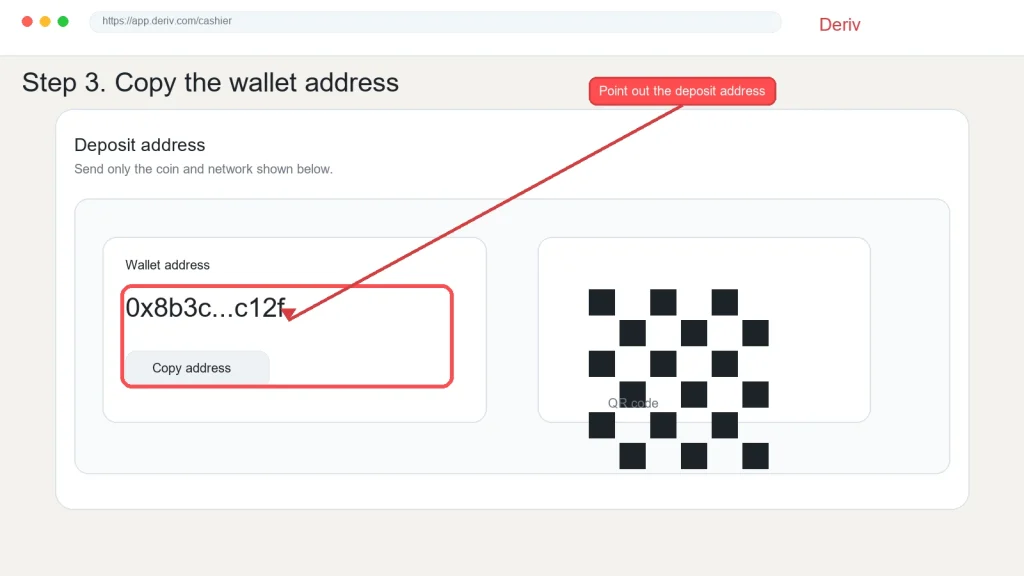
Screenshot showing instructions to copy a wallet address for a crypto deposit on Deriv, with the address partially shown as "0x8b3c...c12f" and a highlighted button labeled "Point out the deposit address." A black-and-white QR code is also visible, making it easy to deposit using crypto.
Screenshot showing instructions to copy a wallet address for a crypto deposit on Deriv, with the address partially shown as “0x8b3c…c12f” and a highlighted button labeled “Point out the deposit address.” A black-and-white QR code is also visible, making it easy to deposit using crypto.

Step 4: Send the Funds From Your Wallet

Open your crypto wallet or exchange account, paste the address, and send the amount you want to deposit. Double-check the address and network match exactly before confirming.
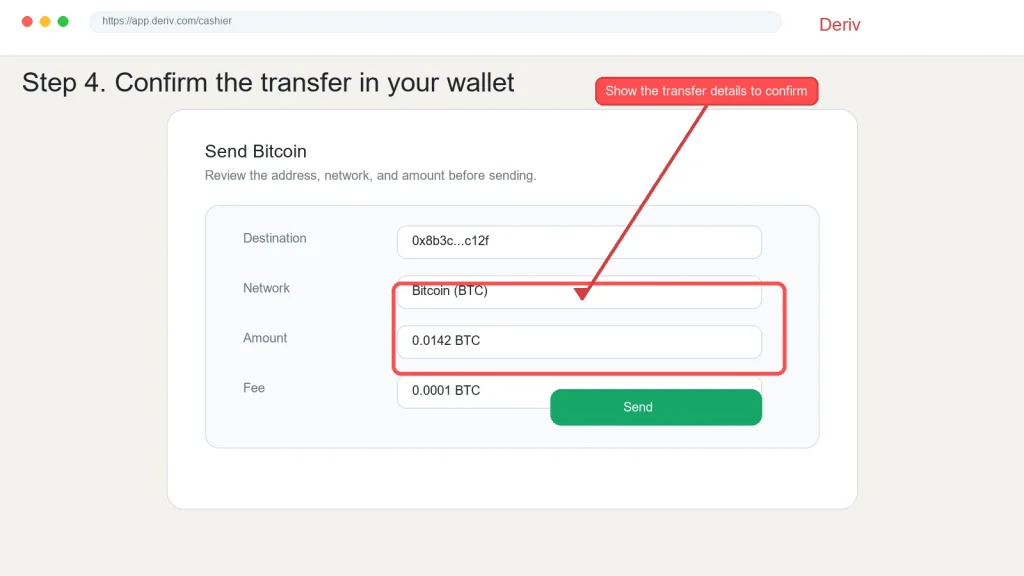
A webpage showing a Bitcoin transfer form, with fields for destination, network, amount, and fee—ideal for anyone learning how to deposit crypto on Deriv. A red arrow points to the "Show the transfer details to confirm" button at the top right, guiding users through a smooth Crypto Deposit Deriv process.
A webpage showing a Bitcoin transfer form, with fields for destination, network, amount, and fee—ideal for anyone learning how to deposit crypto on Deriv. A red arrow points to the “Show the transfer details to confirm” button at the top right, guiding users through a smooth Crypto Deposit Deriv process.

Step 5: Wait for Blockchain Confirmation

Crypto deposits need to be confirmed on the blockchain before reflecting in your Deriv account. This can take anywhere from a few minutes to longer, depending on network congestion.
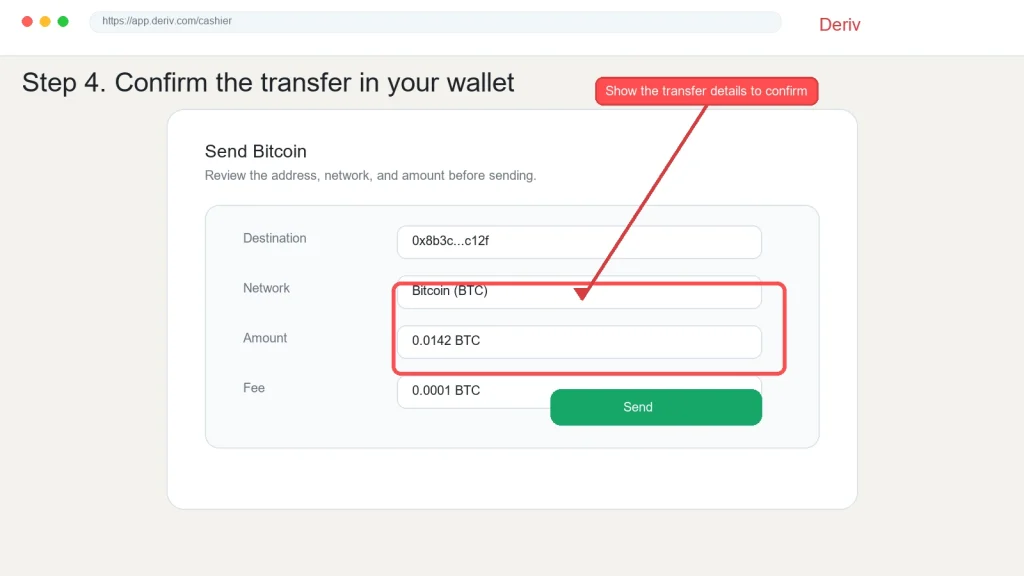
A form to send Bitcoin shows fields for destination, network (Bitcoin), amount (0.0142 BTC), and fee (0.0001 BTC). A red box highlights details; a pop-up says, "Show the transfer details to confirm." This layout is similar to the steps you’ll see when making a Crypto deposit on Deriv or following instructions on how to deposit Bitcoin securely.
A form to send Bitcoin shows fields for destination, network (Bitcoin), amount (0.0142 BTC), and fee (0.0001 BTC). A red box highlights details; a pop-up says, “Show the transfer details to confirm.” This layout is similar to the steps you’ll see when making a Crypto deposit on Deriv or following instructions on how to deposit Bitcoin securely.

Step 6: Confirm the Deposit Reflects in Your Account

Once confirmed, your Deriv balance updates automatically. Check your Cashier transaction history to confirm the deposit went through correctly.

A screenshot shows a Deriv crypto deposit confirmation page with transaction details, highlighting the “Complete” status and a button reading “Confirm the completed deposit.”.

Deposit Complete

That’s the full process for funding your Deriv account with crypto, from selecting a coin to confirming the balance update. You can also look at How to Deposit using Visa and Mastercard for another instant deposits alternative.

Another way to earn from Deriv is through the Deriv Partner Program. This will not require that you trade but you can help traders get on board with Deriv and get income in the process.

Gold bars, oil barrels, and agricultural icons appear on a golden background with a rising line graph. Text reads: “Trade Gold & Commodities. Profit from market moves. Join Deriv.” Icons represent gold, oil, agriculture, and metals.

FAQ: Depositing Using Crypto on Deriv

How long does a crypto deposit take on Deriv? This depends on blockchain confirmation times, which vary by coin and network congestion, but it’s often faster than a bank transfer.

What happens if I send crypto to the wrong network? Sending on the wrong network can result in lost funds, so always confirm the network matches what Deriv specifies before transferring.

Are there fees for depositing crypto on Deriv? Deriv itself doesn’t typically charge a deposit fee, but your wallet or exchange may apply its own network transaction fee.

Which cryptocurrencies does Deriv accept for deposits? This varies by account and region, so check the cryptocurrency options listed directly in your Cashier for what’s currently supported.

A globe with a red upward arrow and bar graph. Text: “Support traders and earn commissions. Discover success in forex affiliate marketing—partner with a global trading platform.” Red button says “Explore Program.”.
Learn Affiliate Marketing and Earn Online

Leave a Comment

Your email address will not be published. Required fields are marked *

Learn Affiliate Marketing and Earn Online
Scroll to Top
