How to Deposit Using Bank Transfer on Deriv

Bank transfers remain one of the most trusted ways to fund a trading account, especially for traders who prefer working directly through their bank rather than cards or e-wallets. While it may take a little longer than instant methods, a bank transfer deposit on Deriv is secure, reliable, and well-suited for larger deposit amounts. In this guide, we’ll walk you through exactly how to deposit using bank transfer on Deriv, step by step, so your funds arrive safely and without confusion. For further reading on how you can protect your online trading related transactions take a look at FTC Consumer Advice.

If you still need a Deriv account, create a Deriv account first so you can finish the deposit without stopping later. If you want to double-check your account readiness, see our How to Verify Your Deriv Account.
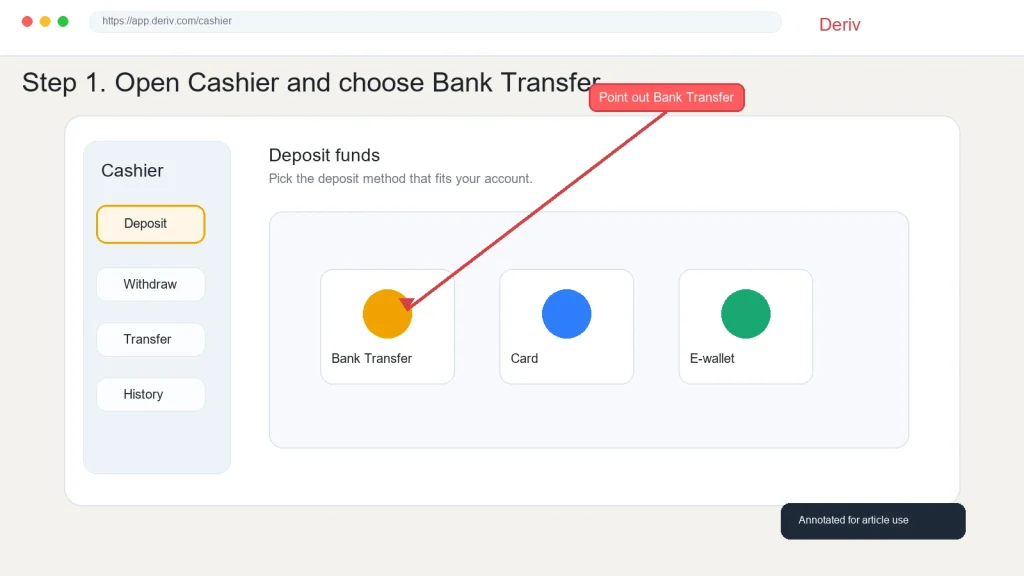
A screenshot displaying the Deriv cashier page with options: Bank Transfer, Card, and E-wallet. A red label and arrow highlight "Bank Transfer" as the selected deposit method.
A screenshot displaying the Deriv cashier page with options: Bank Transfer, Card, and E-wallet. A red label and arrow highlight “Bank Transfer” as the selected deposit method.

Step 1: Go to the Deriv Cashier

Log into your Deriv account and click “Deposit” or “Cashier” from the main dashboard.

Step 2: Select Bank Transfer as Your Method

From the list of deposit options, choose “Bank Transfer”. Availability depends on your account’s currency and region.
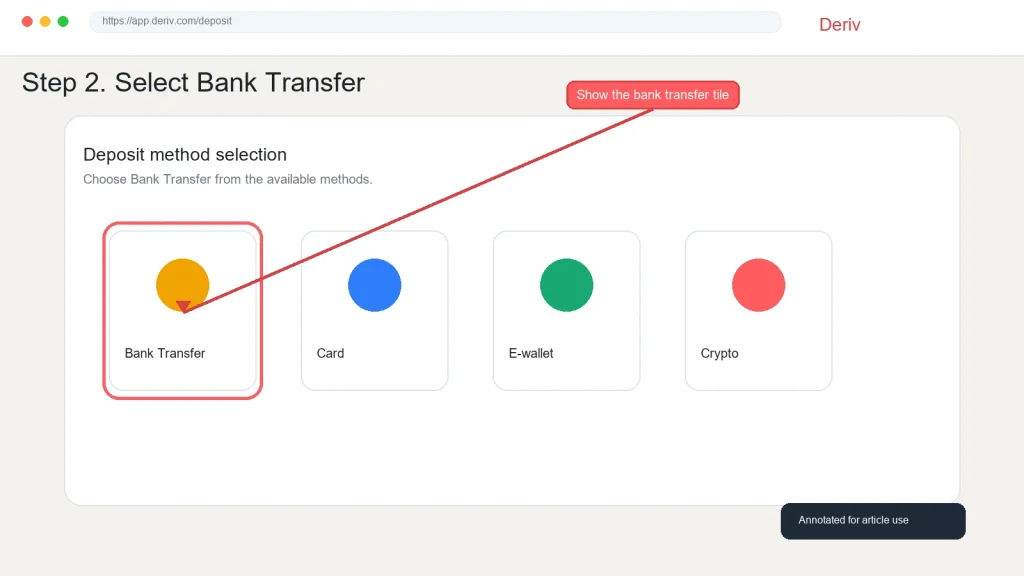
A Deriv webpage displays four deposit methods: Bank Transfer, Card, E-wallet, and Crypto. A red line highlights and points to the bank transfer option with a note: "Show the bank transfer tile.
A Deriv webpage displays four deposit methods: Bank Transfer, Card, E-wallet, and Crypto. A red line highlights and points to the bank transfer option with a note: “Show the bank transfer tile.

Step 3: Review the Bank Details Provided

Deriv will display the bank account details you need to transfer funds to, including account number, bank name, and any required reference number.
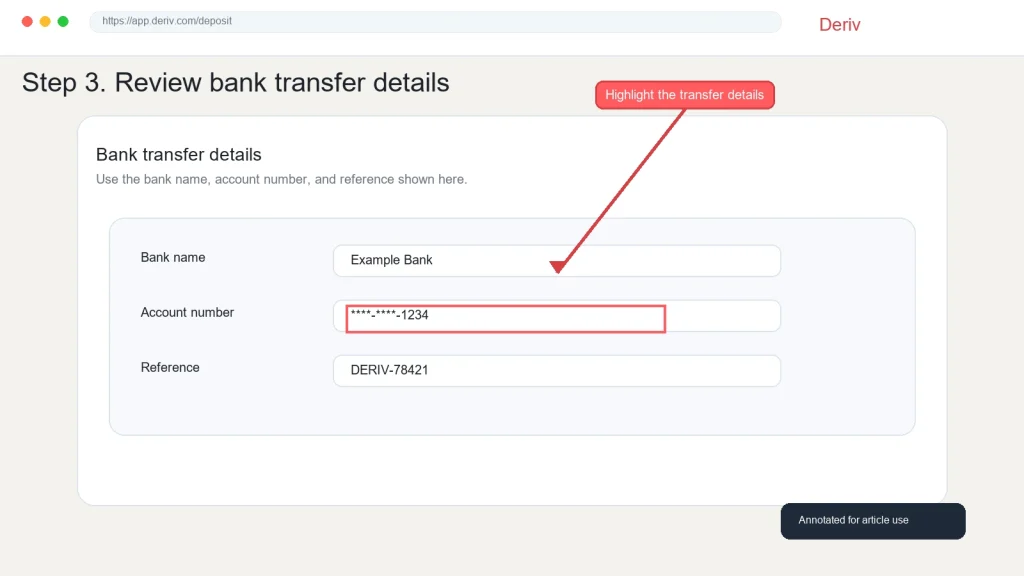
A webpage shows step 3 of reviewing your Deriv bank transfer details. A red arrow and box highlight the partially masked account number entry. The bank name, account number, and deposit reference fields are displayed.

Step 4: Include the Correct Reference Number

Make sure to include the exact reference number shown, since this is how Deriv matches your transfer to your account. Missing or incorrect references can delay processing significantly.
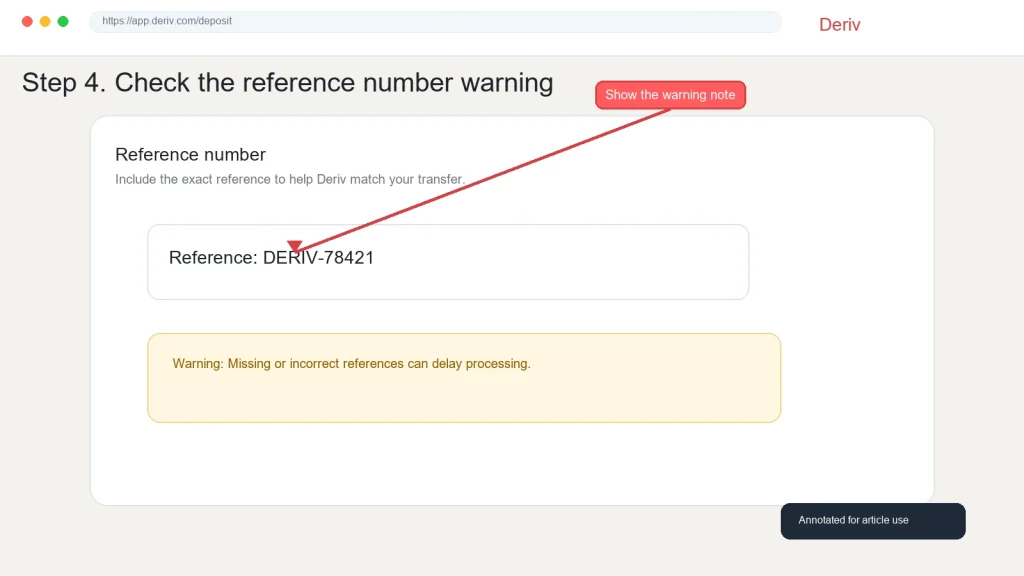
A webpage instructs users to check a reference number warning before making a bank transfer or deposit with Deriv. An arrow points to a red “Show the warning note” button. The reference number “DERV-78421” is shown, along with a warning about incorrect references.

Step 5: Make the Transfer From Your Bank

Log into your own bank’s app or website and initiate the transfer using the details provided, double-checking every digit before confirming.
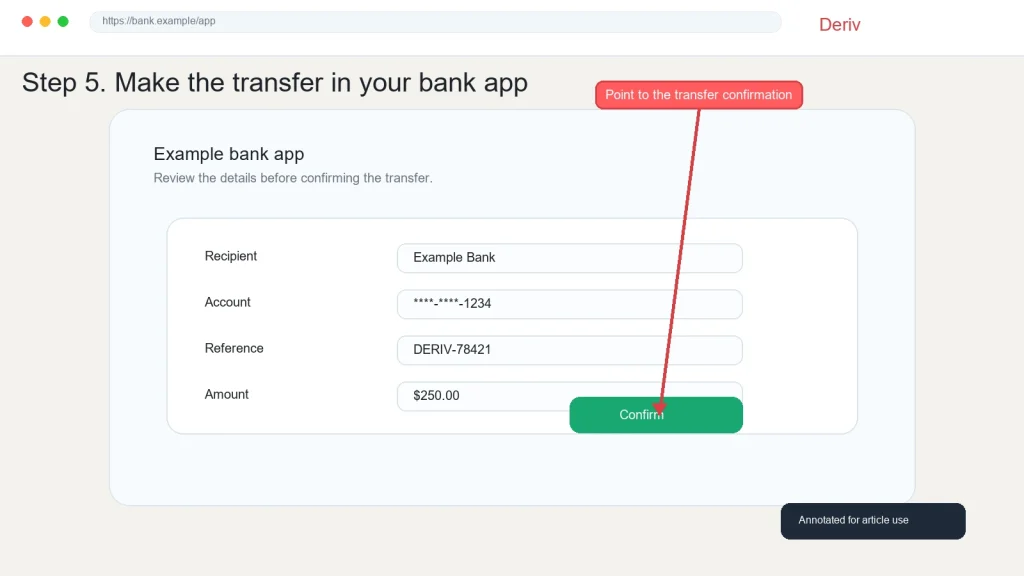
A Deriv bank transfer confirmation screen with fields for recipient, account, reference, and amount. A red arrow points to the green "Confirm" button, labeled "Point to the transfer confirmation.
A Deriv bank transfer confirmation screen with fields for recipient, account, reference, and amount. A red arrow points to the green “Confirm” button, labeled “Point to the transfer confirmation.

Step 6: Wait for the Deposit to Reflect

Bank transfers typically take longer than cards or e-wallets, often a few business days depending on your bank and location. Check your Cashier for updates.
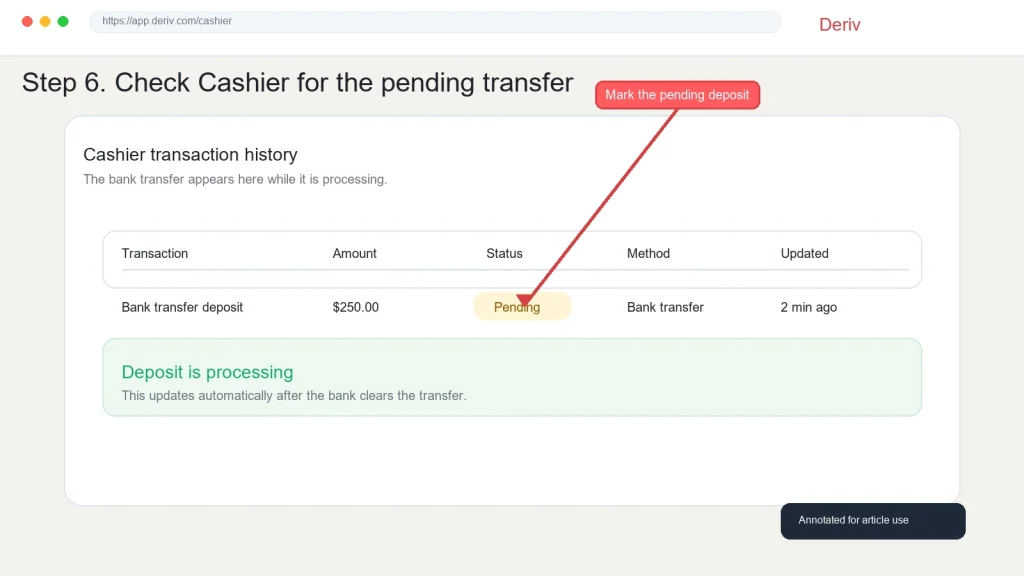
A website page by Deriv instructs users to check a pending bank transfer. A red arrow points to a red button labeled "Mark the pending deposit." The status of a $250.00 deposit via bank transfer is marked as "Pending.
A website page by Deriv instructs users to check a pending bank transfer. A red arrow points to a red button labeled “Mark the pending deposit.” The status of a $250.00 deposit via bank transfer is marked as “Pending.

Funds Received

Once the transfer clears, your Deriv balance updates automatically, and you’re ready to trade or transfer to a linked MT5 account. If you are looking for a quick, almost instant deposit method you can check How to deposit using Visa and Mastercard or How to Deposit using Crypto.

A globe with a red upward arrow and bar graph. Text: “Support traders and earn commissions. Discover success in forex affiliate marketing—partner with a global trading platform.” Red button says “Explore Program.”.

Deriv has been empowering traders and individuals worldwide through the Deriv Partner Program. For traders and individuals who like supporting traders this is a great way to earn without placing any trade.

FAQ: Depositing Using Bank Transfer on Deriv

How long does a bank transfer deposit take on Deriv? It varies by bank and location, but typically takes a few business days rather than being instant like cards or e-wallets.

What happens if I forget to include the reference number? The transfer may be delayed while Deriv manually matches it to your account. Always double-check the reference before sending.

Are there fees for depositing via bank transfer? Deriv itself doesn’t always charge a fee, but your bank may apply its own transfer fees, especially for international transfers.

Can I use bank transfer for any account currency? Availability depends on your account’s currency and region, so check the Cashier to confirm it’s offered for your account.

Gold bars, oil barrels, and agricultural icons appear on a golden background with a rising line graph. Text reads: “Trade Gold & Commodities. Profit from market moves. Join Deriv.” Icons represent gold, oil, agriculture, and metals.

Learn Affiliate Marketing and Earn Online

Leave a Comment

Your email address will not be published. Required fields are marked *

Learn Affiliate Marketing and Earn Online
Scroll to Top