How to Withdraw Using a Payment Agent on Deriv

Not every trader has access to traditional banking methods or e-wallets, and that’s where Deriv’s payment agents come in. These trusted local intermediaries make it possible to withdraw funds through familiar, region-specific payment options. There is no bank card or international transfer required. In this guide, we’ll walk you through exactly how to withdraw using a payment agent on Deriv, step by step, so you can access your funds in a way that works best for you. It is important to understand the risks that come with doing online transactions. The CFTC Learn and Protect shows you how to protect yourself specifically for trading related transactions like deposits and withdrawals.

If you are completely new to this method of withdrawing and depositing you can also check out How Deriv P2P Works. This will put you in a better position to weigh your options.
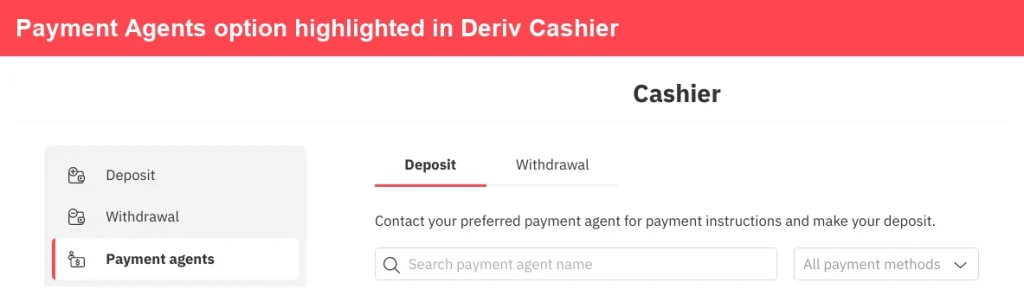
Screenshot of Deriv Cashier page with the "Payment agents" option highlighted in the left menu. The main section displays "Deposit" and "Withdrawal" tabs along with a payment agent search bar, illustrating how to withdraw via Deriv payment agent for quick and convenient transactions.
Screenshot of Deriv Cashier page with the “Payment agents” option highlighted in the left menu. The main section displays “Deposit” and “Withdrawal” tabs along with a payment agent search bar, illustrating how to withdraw via Deriv payment agent for quick and convenient transactions.


Step 1: Go to Payment Agents in your Deriv Wallet


Log into your Deriv account, open Wallet, and select “Payment Agents”. This lists agents available for your account’s country and currency.

Step 2: Compare Available Agents


Review the list of agents, checking their accepted payment methods and contact details. It’s worth comparing a few, especially if you’re after a specific local option.

Screenshot of the Deriv payment agent list page showing Deposit and Withdrawal tabs, a search bar, and a description about offering deposit and withdrawal services on Deriv. Logos for SticPay and PayPal are visible.
A digital ad for Deriv promotes trading synthetic indices 24/7, highlighting volatility and control. Icons show trading benefits, with a red "Start Now" button guiding users through the Deriv registration process. Red and black wavy lines enhance the look.
A digital ad for Deriv promotes trading synthetic indices 24/7, highlighting volatility and control. Icons show trading benefits, with a red “Start Now” button guiding users through the Deriv registration process. Red and black wavy lines enhance the look.


Step 3: Contact the Agent to Arrange Withdrawal


Reach out to your chosen agent directly using their listed contact details, since Payment Agents operate independently rather than processing everything inside Deriv itself.
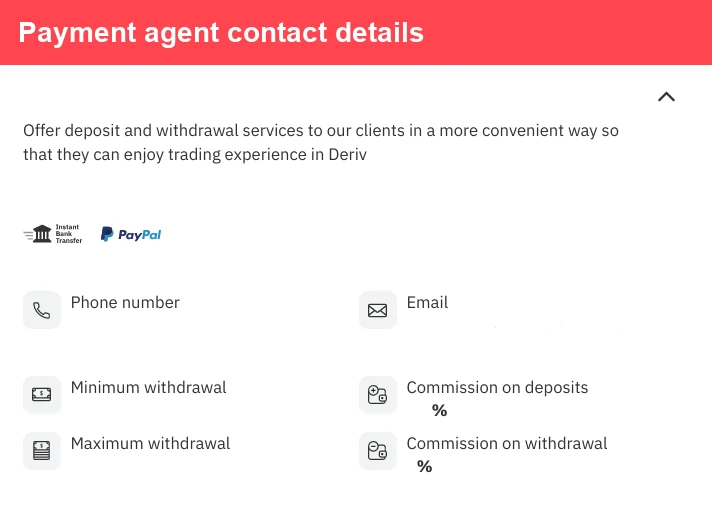

Payment agent contact details page displays icons for bank transfer, PayPal, phone number, email, minimum and maximum withdrawal amounts, as well as commission rates for deposits and withdrawals. This comprehensive Deriv payment agent guide ensures you have all the information needed for a smooth Deriv payment agent withdrawal or cash out process.

A globe with a red upward arrow and bar graph. Text: “Support traders and earn commissions. Discover success in forex affiliate marketing—partner with a global trading platform.” Red button says “Explore Program.”.


Step 4: Confirm the Transaction Details


Agree on the amount, payment method, and any rate or fee with the agent before proceeding. Reputable agents will be upfront about their process.
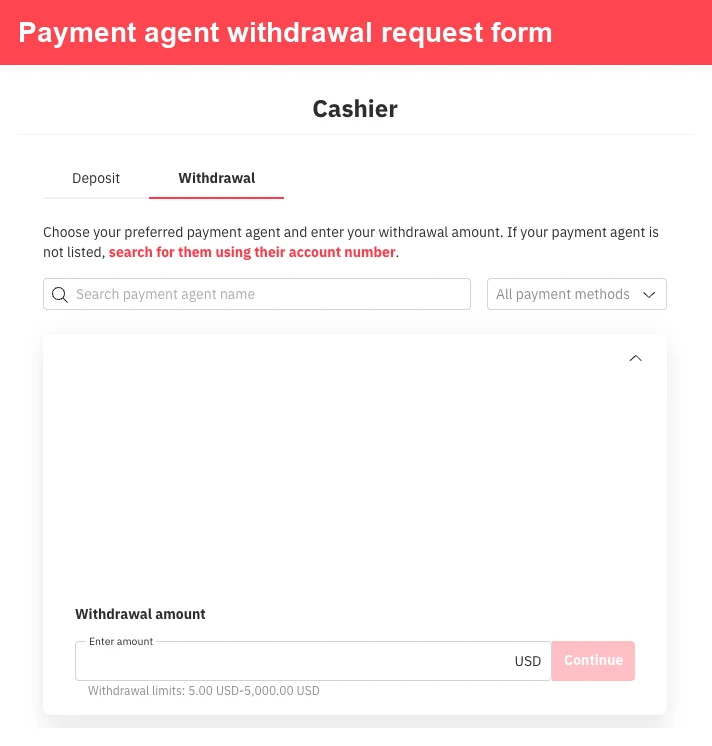
Description (with keywords blended in): The Deriv payment agent withdrawal request form features intuitive tabs for Deposit and Withdrawal, a convenient search box for Deriv payment agents, a blank area for agent selection, and a designated field to enter your withdrawal amount in USD. With clear guidance drawn from the Deriv payment agent guide, the Continue button remains disabled until all necessary information is provided—ensuring a.
The Deriv payment agent withdrawal request form features intuitive tabs for Deposit and Withdrawal, a convenient search box for Deriv payment agents, a blank area for agent selection, and a designated field to enter your withdrawal amount in USD. With clear guidance drawn from the Deriv payment agent guide, the Continue button remains disabled until all necessary information is provided—ensuring a.


Step 5: Initiate the Withdrawal in Deriv


Submit the withdrawal request through Deriv, selecting your chosen Payment Agent. The equivalent amount will be deducted from your Deriv balance.

Withdrawal request form displaying fields to select a payment agent, input withdrawal amount in USD, and a "Continue" button. Tabs for "Deposit" and "Withdrawal" are visible at the top, making it easy to follow the Deriv payment agent guide when you want to withdraw Deriv payment agent funds or initiate your Deriv agent cash out.
Withdrawal request form displaying fields to select a payment agent, input withdrawal amount in USD, and a “Continue” button. Tabs for “Deposit” and “Withdrawal” are visible at the top, making it easy to follow the Deriv payment agent guide when you want to withdraw Deriv payment agent funds or initiate your Deriv agent cash out.


Step 6: Receive Payment From the Agent


The agent pays you locally through your agreed method, once the withdrawal request has been processed on Deriv’s side.
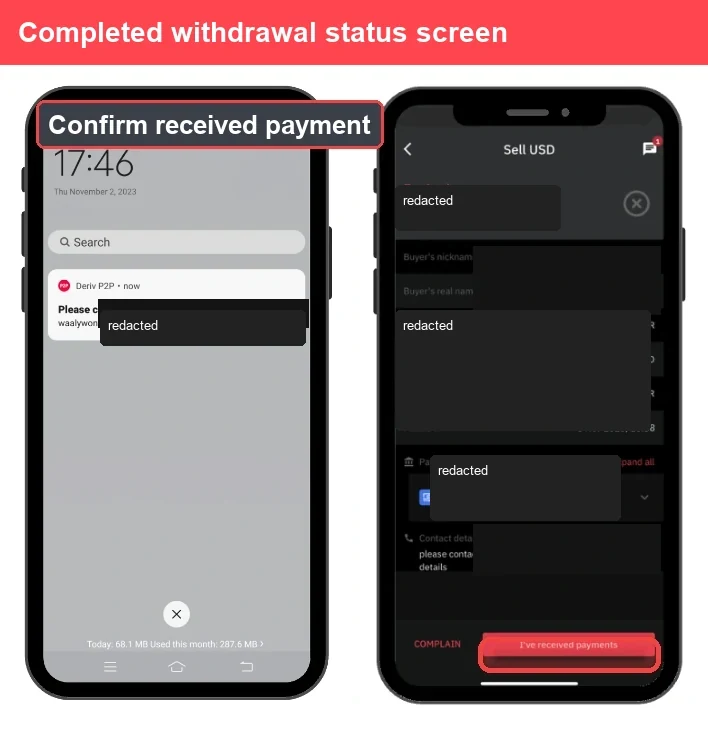
Two smartphones show withdrawal confirmation: the left displays a payment notification, while the right shows a "Sell USD" screen with redacted details and a highlighted "I've received payments" button—illustrating the process to withdraw Deriv payment agent funds smoothly.
Two smartphones show withdrawal confirmation: the left displays a payment notification, while the right shows a “Sell USD” screen with redacted details and a highlighted “I’ve received payments” button—illustrating the process to withdraw Deriv payment agent funds smoothly.


Withdrawal Complete

That’s the full process for withdrawing through a Deriv Payment Agent. Since agents work independently, always confirm their details and reputation before sending any request. You can also learn about an alternative way to withdraw through this guide How to withdraw using Deriv P2P

The Deriv Partner Program is the one of the most popular ways that traders are using to earn extra income. For traders or individuals interested in helping traders to join Deriv this is a perfect vehicle to make extra revenue without placing a trade.


FAQ: Withdrawing Using a Payment Agent on Deriv


Are Deriv Payment Agents part of Deriv itself? No, Payment Agents are independent individuals or businesses authorized by Deriv to offer local deposit and withdrawal services.
Is it safe to withdraw through a Payment Agent? Deriv vets and lists agents on its platform, but since the transaction happens directly between you and the agent, it’s worth checking their track record first.
Do Payment Agents charge withdrawal fees? Some may charge a small fee or adjust their rate slightly, so confirm this with the agent before initiating the withdrawal.
What if a Payment Agent doesn’t complete the payment? Report the issue to Deriv support, who can look into the agent and transaction on your behalf.
Learn Affiliate Marketing and Earn Online

Leave a Comment

Your email address will not be published. Required fields are marked *

Learn Affiliate Marketing and Earn Online
Scroll to Top
