How to withdraw using Deriv P2P

For traders who want more flexibility and speed with their withdrawals, Deriv’s P2P (peer-to-peer) feature offers a convenient alternative to traditional payment methods. Instead of relying solely on banks or cards, P2P lets you withdraw funds directly through trusted local traders, often with faster turnaround times and support for local payment options. In this guide, we’ll walk you through exactly how to withdraw using Deriv P2P, step by step, so you can access your funds quickly and safely. Speaking of safety, familiarize yourself with the FTC Consumer Advice to see ways you can protect your capital from scammers.

If you still need a Deriv account, create a Deriv account first. For a broader overview of the feature, see How Deriv P2P Works.

Step 1: Open Deriv P2P

Log into your Deriv account, go to Wallet, and select “Deriv P2P”. If you still need help setting up access before you withdraw, see How to Verify Your Deriv Account.

Step 2: Go to the Buy Tab

To withdraw, you’ll be selling your Deriv balance, so look at the “Sell” tab, where buyers post ads offering to purchase funds from you at a set rate.

Screenshot of a Deriv P2P ad list page showing buy ads in BRL, with filters for currency and sorting, offer limits, rates, payment methods, and red "Buy USD" buttons next to each advertiser—perfect for users looking to Deriv P2P cash out or review options before making a Deriv P2P withdrawal.
Screenshot of a Deriv P2P ad list page showing buy ads in BRL, with filters for currency and sorting, offer limits, rates, payment methods, and red “Buy USD” buttons next to each advertiser—perfect for users looking to Deriv P2P cash out or review options before making a Deriv P2P withdrawal.

Step 3: Choose an Ad That Matches Your Needs

Compare ads based on rate, payment method, and transaction limits. Check the buyer’s rating and completion history before proceeding.

A Deriv P2P ad shows two sellers with their trading limits, rates in USD, and payment methods available for Deriv peer to peer withdrawal. Both have an option to "Buy USD." Bold text at the top says, "Compare rate, limits, and method," making it easy to withdraw Deriv P2P or simply find the best way for a quick Deriv P2P.
A Deriv P2P ad shows two sellers with their trading limits, rates in USD, and payment methods available for Deriv peer to peer withdrawal. Both have an option to “Buy USD.” Bold text at the top says, “Compare rate, limits, and method,” making it easy to withdraw Deriv P2P or simply find the best way for a quick Deriv P2P.

Step 4: Start the Order

Click on the ad, enter the amount you want to withdraw, and confirm to start the trade. Your funds will be held in escrow for the duration of the trade.

A smartphone screen displays a Deriv P2P order confirmation page, highlighting “Review amount and pay”. Sensitive details are redacted with black boxes. The payment method shown is Skrill, illustrating the process of Deriv peer to peer withdrawal.

Step 5: Wait for Payment From the Buyer

The buyer pays you directly using the agreed payment method. Do not release the funds until you’ve confirmed the payment has actually landed in your account.

A smartphone screen shows the Deriv P2P chat payment page with sensitive info redacted. A label says, "Tap I've paid," highlighting the pink "I've paid" button at the bottom—an essential step when completing your Deriv P2P withdrawal or proceeding with a Deriv peer to peer withdrawal securely.
A smartphone screen shows the Deriv P2P chat payment page with sensitive info redacted. A label says, “Tap I’ve paid,” highlighting the pink “I’ve paid” button at the bottom—an essential step when completing your Deriv P2P withdrawal or proceeding with a Deriv peer to peer withdrawal securely.

Step 6: Release the Funds

Gold bars, oil barrels, and agricultural icons appear on a golden background with a rising line graph. Text reads: “Trade Gold & Commodities. Profit from market moves. Join Deriv.” Icons represent gold, oil, agriculture, and metals.

Once you’ve confirmed payment, click “Release” to complete the trade. The amount is deducted from your Deriv balance and the order is marked complete. For an alternative you could also look at How to withdraw using a Deriv payment agent.
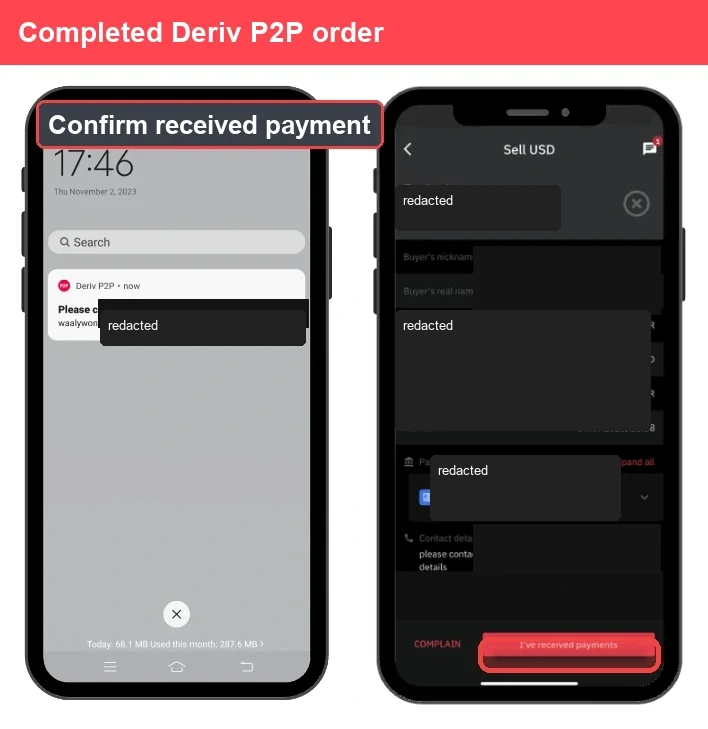
Two phone screens show a Deriv P2P sell order: one with a payment notification and the other displaying a transaction confirmation screen. Personal information is redacted. A banner says, "Completed Deriv peer to peer withdrawal.
Two phone screens show a Deriv P2P sell order: one with a payment notification and the other displaying a transaction confirmation screen. Personal information is redacted. A banner says, “Completed Deriv peer to peer withdrawal.

Withdrawal Complete

That’s the full cycle for withdrawing through Deriv P2P, from finding a buyer to confirming payment before releasing funds. If you want the general trading flow again before your next withdrawal, read How Deriv P2P Works.

Another way of earning through Deriv without placing a single trade would be through the Deriv Partner Program. By simply introducing traders to Deriv and helping them onboard you get to earn extra income.

FAQ: Withdrawing Using Deriv P2P

Is it safe to withdraw using Deriv P2P? Deriv holds your funds in escrow during the trade, so they’re only released once you’ve confirmed payment, adding a layer of protection.

What if the buyer doesn’t pay? Never release funds without confirmed payment. If there’s an issue, you can raise a dispute and Deriv support will review the chat and payment evidence.

Are there fees for withdrawing through Deriv P2P? Deriv doesn’t typically charge a fee for P2P trades, though the rate offered may differ slightly from the standard market rate.

How long does a Deriv P2P withdrawal take? This depends on how quickly the buyer pays, but trades are often completed within minutes once payment is confirmed.

A digital ad with the text "Support traders and earn commissions. Partner with a global trading platform." A red arrow rises over a gray globe. A red button below says "Explore Program.
A digital ad with the text “Support traders and earn commissions. Partner with a global trading platform.” A red arrow rises over a gray globe. A red button below says “Explore Program.
Learn Affiliate Marketing and Earn Online

Leave a Comment

Your email address will not be published. Required fields are marked *

Learn Affiliate Marketing and Earn Online
Scroll to Top