Weltrade actually involves two separate sets of login credentials, your Personal Profile login and your MT5 trading account login, and knowing which is which prevents a lot of unnecessary confusion. Here’s how to log in across every platform. If you are accessing your Weltrade trading account through MT5, it can also be useful to understand how the MetaTrader platform handles account connections and platform settings. The official MetaTrader 5 getting-started guide explains the platform’s basic setup and account-access functions.

If you do not have a Weltrade account yet you create one here in just ten seconds.
Understanding the Two Login Types
Your Weltrade profile login (email and password) gives access to your Personal Profile, where you manage deposits, withdrawals, account settings, and verification. Your MT5 trading account login (a numeric account number and a separate trading password) is what you use specifically inside the MT5 platform to place trades. These two sets of credentials are different and can’t be used interchangeably.

Logging In via Website
Visit the official Weltrade website and click the login option, typically in the top-right corner. Enter your registered email and profile password to access your Personal Profile, where you can view account balances, manage funding, and access platform downloads. For the full password reset process, see our guide on How to Reset Your Weltrade Password.

Logging In via Mobile App
Download the Weltrade app from the App Store or Google Play, open it, and sign in using the same email and profile password used on the website. Both access the same underlying account, so any changes made on one are reflected on the other.
Logging In to MT5 Desktop
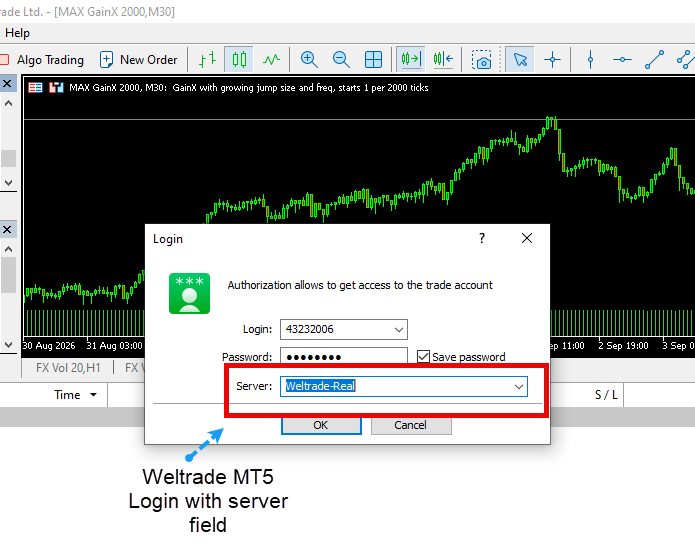
Open MT5 on your computer, select File → Login to Trade Account, and enter your MT5 account number, trading password, and the correct server (typically Weltrade-Live for a funded account or Weltrade-Demo for practice). These credentials were generated specifically for your trading account when it was created and are different from your profile password. For troubleshooting login issues more broadly, see Weltrade Login Problems: Causes and Solutions.
Logging In to MT5 Mobile
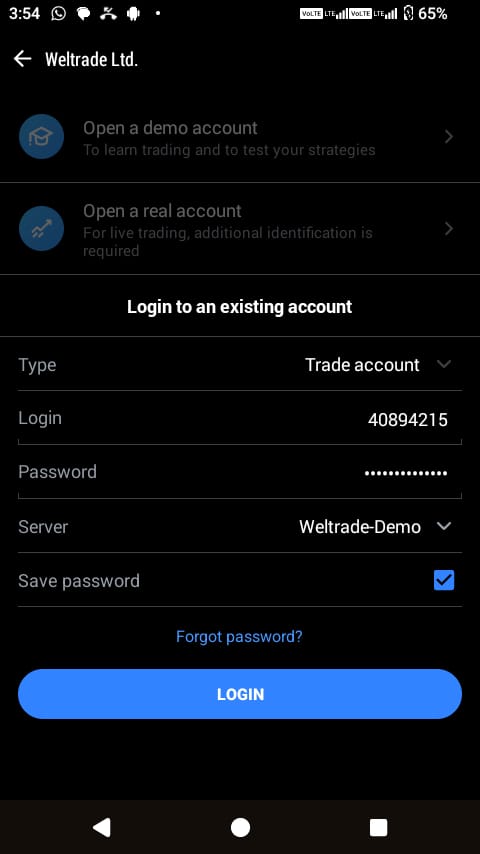
Download the MT5 app from your device’s app store, open it, and select the option to log in to an existing account rather than opening a new demo. Choose Weltrade as your broker, select the correct server, and enter the same account number and trading password used on desktop. The same credentials work across every version of the platform.
Where to Find Your MT5 Credentials
If you’ve misplaced your MT5 login details, they were originally sent to your registered email when the trading account was created, and they’re also visible directly in your Personal Profile under your account details. There’s no need to guess or reset anything if you simply need to locate credentials you already have.
Staying Logged In Across Devices
Both the website and mobile app support staying logged in between sessions on trusted devices, while MT5 lets you save multiple account logins for quick switching between profile types, useful if you’re running more than one Weltrade account, such as a SyntX account alongside a Pro account.

If You’ve Forgotten a Password
Whether it’s your profile password or your MT5 trading password, both can be reset independently through their respective login screens.
Ready to log in and get started? Access your Weltrade account through whichever platform suits you.


