Getting locked out or hitting a login error is frustrating, but most Weltrade login issues trace back to a small set of common causes. Here’s how to diagnose and fix them. Login problems are not always caused by an incorrect password. Browser issues, authentication problems and security protections can also prevent access, which is why CISA recommends using additional authentication methods to strengthen account security.

Create your weltrade acoount in just ten seconds if you have not created one already.
Problem 1: Mixing Up Your Two Login Types
By far the most common cause of login confusion is entering your MT5 trading password on the website login screen, or vice versa. These are genuinely separate credentials. Your profile login (email and password) and your MT5 trading login (account number and trading password) don’t work interchangeably. Double-checking which login screen you’re on and which credentials it expects resolves this instantly. For the full breakdown of login credentials across platforms, see Weltrade Login Guide: App, Website and MT5.


Problem 2: Incorrect Server Selection in MT5
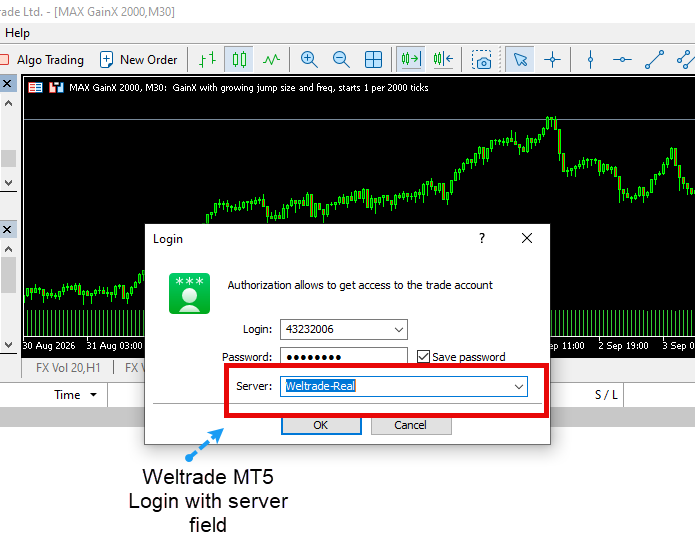
If MT5 shows an “Invalid account” error despite entering the correct account number and password, the server selection is the most likely culprit. Confirm the server shown in your Personal Profile matches exactly what you’ve selected in MT5. A mismatch between Weltrade-Live and Weltrade-Demo, for example, will prevent a successful connection even with otherwise correct credentials.
Problem 3: Forgotten Password
If you genuinely can’t recall either your profile password or your MT5 trading password, both can be reset independently through their respective “Forgot Password” links, which send a reset or activation link to your registered email. This resolves the vast majority of straightforward lockouts without needing to contact support. For resetting a password specifically, see our guide on How to Reset Your Weltrade Password.

Problem 4: Account Not Yet Verified or Restricted
In some cases, a login issue isn’t actually about credentials at all. It’s a restriction placed on the account pending verification or a security review. If you’re able to log in but see limited functionality or specific warnings, checking the Verification section of your profile usually clarifies what’s needed to restore full access.

Problem 5: Outdated App or Platform Version
Occasionally, login issues on mobile stem from an outdated app version that’s incompatible with current server requirements. Checking your app store for available updates and installing the latest version before troubleshooting further rules this out quickly.
Problem 6: Connection or Network Issues
A slow or unstable internet connection can occasionally cause MT5 login attempts to time out or fail without a clear error message. Restarting the platform, checking your connection, or switching networks briefly resolves this in most cases where credentials and server selection are already confirmed correct.

When to Contact Support Directly
Reaching out to Weltrade support directly, with your account number and a description of the exact error message ready, tends to resolve the issue faster than continuing to troubleshoot blindly. Screenshotting the exact error before contacting support also speeds things up, since it removes any guesswork about what you’re actually seeing.
Still having trouble accessing your account? Log in to Weltrade and work through these steps, or reach out to support directly if the issue persists.