Weltrade runs a different verification process than Deriv, so if you’re used to one platform’s flow, don’t assume the steps carry over. Document requirements, review timelines, and account tiers unlocked by verification all differ by broker. Getting verified unlocks full withdrawal access and higher trading limits on Weltrade specifically. Here’s what the platform actually asks for and how to get through it without delays. Online reviews can provide useful insight into customers’ experiences with a broker, although individual reviews should always be considered in context. Trustpilot features reviews from Weltrade customers covering areas such as verification, withdrawals, customer support and the trading platform.

If you do not have a Weltrade account yet you create one here in just ten seconds.
Why Verification Is Required
Account verification, often called KYC (Know Your Customer), confirms your identity and helps Weltrade comply with financial regulations designed to prevent fraud and money laundering. It’s a standard requirement across virtually every regulated broker, not something unique or unusual to Weltrade specifically.
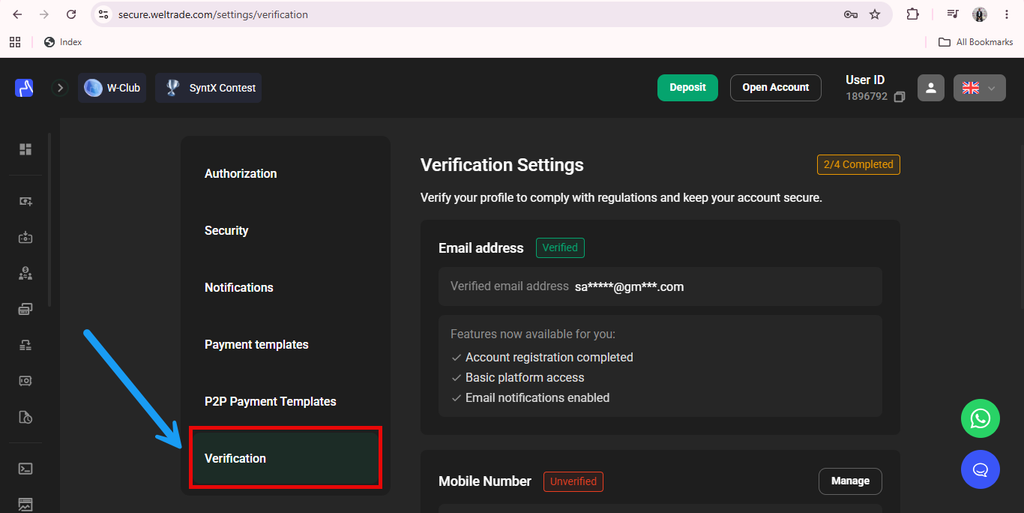
Step 1: Locate the Verification Section
Log in to your Weltrade Personal Profile and find the Verification section, typically accessible directly from your dashboard. This is where you’ll see exactly which documents are required for your specific account and country.
Step 2: Upload Your Identity Document
You’ll be asked to upload a valid identity document, a passport or national ID card in most cases. The name on this document needs to match the name used during registration exactly, since a mismatch will cause automatic verification to fail and send your case for manual review instead. Uploading a full, uncropped photo of the document, rather than a partial scan or a screenshot of a digital copy, significantly reduces the odds of an automatic rejection at this stage.

Step 3: Complete a Liveness Check (If Required)
Depending on your country, you may be asked to complete a liveness check, where the system enables your camera and compares your face against the photo on your uploaded document. Following the on-screen instructions carefully here, good lighting, a clear view of your face, no obstructions, helps this step complete smoothly on the first attempt. For the specific documents required, see our guide on Weltrade Verification Requirements and Documents

Step 4: Submit and Wait for Review
Once your documents are uploaded and any required checks completed, submit your verification request. Standard verification typically completes within 24 hours, though cases requiring additional checks, such as proof of address or source of funds, can take longer. For realistic processing time expectations, see How Long Does Weltrade Verification Take?
What to Do If Verification Is Rejected
If your submission is rejected, Weltrade provides specific instructions on what needs to be corrected. Usually related to document clarity, expired documents, or a mismatch between your profile details and the document itself. Reviewing the rejection reason carefully, correcting the specific issue, and resubmitting clear, well-lit documents resolves most rejected cases on the second attempt. Rushing a resubmission without actually addressing the stated reason tends to produce another rejection, so it’s worth taking the extra minute to fix the specific issue flagged rather than just uploading the same document again.

Getting a Confirmation
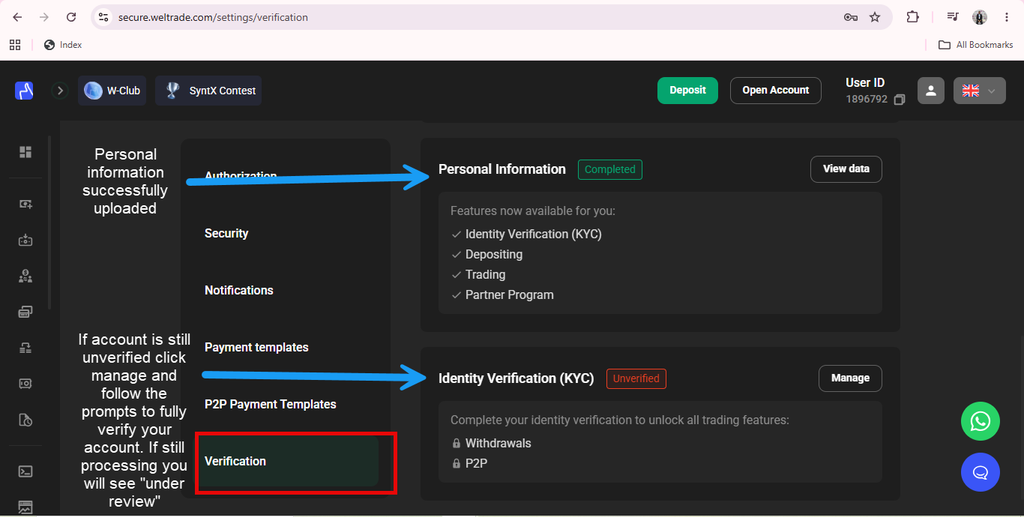
Once verification is approved, you’ll receive a confirmation email, and your account will show full access to withdrawals and complete trading features. There’s no need to re-verify for future deposits or withdrawals once this step is successfully completed, barring any later security flags on the account.

Doing This Early
Completing verification as soon as you register, rather than waiting until you actually want to withdraw funds, avoids unnecessary delays at the exact moment you’re hoping to access your money quickly.
Ready to get verified? Log in to your Weltrade account and complete verification before you need to withdraw.