How to Withdraw Money to Your Bank Account on Deriv

Getting your trading profits safely into your bank account is one of the most important parts of the Deriv experience, and thankfully, the platform makes it a simple, straightforward process. Whether you’re cashing out for the first time or just want a refresher on the steps, knowing exactly how to withdraw money to your bank account ensures your funds move quickly and securely, without any unnecessary delays. In this guide, we’ll walk you through the full withdrawal process to your bank account on Deriv, step by step, so you can access your money with confidence. The Bank for International settlements can you educate you a bit further to understand what happens behind the scenes when your withdrawal is being processed.

If you still need a Deriv account, create a Deriv account first so you can finish the withdrawal setup later. If you want to log in to MT5 after the transfer, see our How to Log into MT5 on Deriv.

Screenshot of a dark-themed crypto wallet interface showing 0.00 USD balance, with the “wallets tab” and “demo wallet” highlighted. Options such as deposit, transfer, or Deriv bank withdrawal are visible on the right, simplifying steps to withdraw Deriv to bank account. Sidebar menu is on the left.

Step 1: Make Sure Your Account Is Verified

Before withdrawing, confirm your proof of identity and proof of address are approved in Account Settings. Unverified accounts are usually restricted from withdrawing. You can follow How to Verify your account on Deriv if you have not verified your account.

Step 2: Go to the Deriv Cashier

Log into your Deriv account and click “Withdraw” or “Cashier” from the main dashboard.

A Deriv dashboard shows a USD wallet balance of 0.00, with the "Withdraw" button highlighted—perfect for initiating a Deriv bank transfer withdrawal. Menu options, including Home, CFDs, and Options, are conveniently placed on the left side to help you quickly access key features like tracking your Deriv withdrawal processing time or starting a new Deriv bank withdrawal.
A Deriv dashboard shows a USD wallet balance of 0.00, with the “Withdraw” button highlighted—perfect for initiating a Deriv bank transfer withdrawal. Menu options, including Home, CFDs, and Options, are conveniently placed on the left side to help you quickly access key features like tracking your Deriv withdrawal processing time or starting a new Deriv bank withdrawal.

Step 3: Select Bank Transfer as Your Withdrawal Method

Choose “Bank Transfer” from the list of withdrawal options. Remember, Deriv generally requires withdrawing through the same method used to deposit, up to the amount deposited.
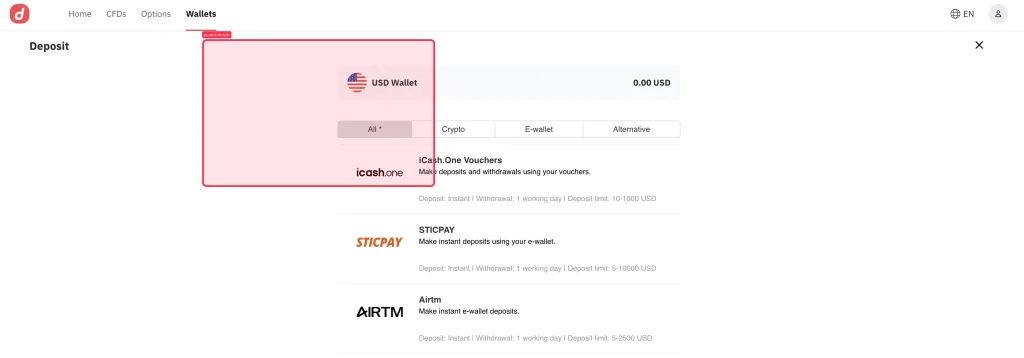
Deposit page showing a USD wallet with options for deposit methods, including iCashOne, STICPAY, and AIRTM. The USD wallet displays a 0.00 USD balance. Tabs for "All", "Crypto", and "E-wallet" are visible, making it easy to manage your funds before initiating a Deriv cashier withdrawal or checking the Deriv withdrawal processing time when you’re ready to.
Deposit page showing a USD wallet with options for deposit methods, including iCashOne, STICPAY, and AIRTM. The USD wallet displays a 0.00 USD balance. Tabs for “All”, “Crypto”, and “E-wallet” are visible, making it easy to manage your funds before initiating a Deriv cashier withdrawal or checking the Deriv withdrawal processing time when you’re ready to.

Step 4: Enter Your Bank Account Details

Provide your bank account number, account holder name, and any additional details required, such as a SWIFT or routing code depending on your bank.

A digital USD wallet interface displays a $0.00 USD balance with options to Deposit, Withdraw, and Transfer, including features for Deriv cashier withdrawal. The design features a US flag icon and minimalist buttons.

Step 5: Enter Your Withdrawal Amount

Gold bars, oil barrels, and agricultural icons appear on a golden background with a rising line graph. Text reads: “Trade Gold & Commodities. Profit from market moves. Join Deriv.” Icons represent gold, oil, agriculture, and metals.

Type in how much you’d like to withdraw, keeping in mind any minimum withdrawal amount and your available balance.

Step 6: Submit and Track Your Request

Review your details and confirm the withdrawal. You can track its status directly in the Cashier, which will show as pending, processing, or completed.

Funds On Their Way

Bank withdrawals typically take longer than e-wallets, often a few business days depending on your bank. Once processed, the funds should reflect in your account. To explore other ways to withdraw you can check out How to withdraw using Deriv P2P.

A digital ad with the text "Support traders and earn commissions. Partner with a global trading platform." A red arrow rises over a gray globe. A red button below says "Explore Program.
A digital ad with the text “Support traders and earn commissions. Partner with a global trading platform.” A red arrow rises over a gray globe. A red button below says “Explore Program.

More and more traders are adding extra income through the Deriv Partner Program. For traders that like supporting other traders and helping them get on board with Deriv, this is a perfect fit.

FAQ: Withdrawing to Your Bank Account on Deriv

How long does a bank withdrawal take on Deriv? It usually takes a few business days, depending on your bank and location, and can be slower than e-wallet withdrawals.

Why do I need to withdraw using the same method I deposited with? This is a standard anti-fraud measure. You can withdraw up to your total deposited amount through the original method, with any remainder withdrawable through other supported methods.

What if my bank details are entered incorrectly? Double-check everything before submitting, since incorrect details can delay or fail the withdrawal, sometimes requiring you to resubmit the request.

Is there a minimum withdrawal amount for bank transfers on Deriv? Yes, this varies by currency and is shown on the withdrawal screen once you select bank transfer as your method.
Learn Affiliate Marketing and Earn Online

Leave a Comment

Your email address will not be published. Required fields are marked *

Learn Affiliate Marketing and Earn Online
Scroll to Top
